 |
CUGL 4.0
Cornell University Game Library
|
Loading...
Searching...
No Matches
|
CUGL 4.0
Cornell University Game Library
|
#include <CUScene.h>
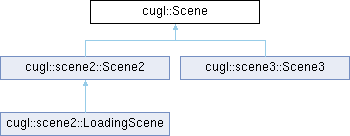
Public Member Functions | |
| Scene () | |
| ~Scene () | |
| virtual void | dispose () |
| virtual bool | init () |
| const std::string & | getName () const |
| void | setName (const std::string name) |
| std::shared_ptr< Camera > & | getCamera () |
| const std::shared_ptr< Camera > & | getCamera () const |
| virtual std::string | toString (bool verbose=false) const |
| operator std::string () const | |
| const Size & | getSize () const |
| const Rect | getBounds () const |
| Vec3 | screenToWorldCoords (const Vec2 &screenCoords) const |
| Vec2 | worldToScreenCoords (const Vec3 &worldCoords) const |
| bool | isActive () const |
| virtual void | setActive (bool value) |
| virtual void | update (float dt) |
| virtual void | reset () |
| virtual void | render () |
Protected Attributes | |
| std::shared_ptr< Camera > | _camera |
| std::string | _name |
| Size | _size |
| bool | _active |
This class provides the root class of an application scene.
Most applications are composed of one or more scenes, with the application root responsible for switching between them. Typically these scenes have associated scene graphs. However scene graphs are specific to a rendering pipeline. Therefore it is useful to have a base class that is pipeline agnostic.
Scenes are designed to fill the entire screen. However, to better support aspect ratio independent design, many screens are height or width locked. In each case that means that this particular dimension is fixed to a particular size. This makes it possible to layout UI elements with Figma or other tools.
While Scenes are designed to fill the entire screen, it is possible to render multiple scenes on top of each other. This can be useful for transition effects or for UI layers where you want the camera to be separate from the main game layer.
This class has no static allocators as it is an abstract class intended to be subclassed
|
inline |
Creates a new degenerate Scene on the stack.
The scene has no view size and must be initialized.
NEVER USE A CONSTRUCTOR WITH NEW. If you want to allocate an object on the heap, use one of the static constructors instead.
|
inline |
Deletes this scene, disposing all resources
|
inlinevirtual |
Disposes all of the resources used by this scene.
A disposed Scene can be safely reinitialized. Any children owned by this scene will be released. They will be deleted if no other object owns them.
Reimplemented in cugl::scene2::LoadingScene, cugl::scene2::Scene2, and cugl::scene3::Scene3.
|
inline |
|
inline |
Returns the camera for this scene.
|
inline |
Returns the camera for this scene.
|
inline |
Returns a string that is used to identify the scene.
|
inline |
|
virtual |
Initializes a Scene to fill the display.
The meaning of this initializer depends upon the appropriate subclass.
Reimplemented in cugl::scene2::Scene2, and cugl::scene3::Scene3.
|
inline |
Returns true if the scene is currently active
|
inline |
Cast from a Scene to a string.
|
inlinevirtual |
Renders this screen to the scene.
This method make no assumption about the graphics pipeline. Each scene is capable of having its own pipeline.
Reimplemented in cugl::scene2::Scene2, and cugl::scene3::Scene3.
|
inlinevirtual |
Resets the status of the scene to its original configuration.
Returns the world space equivalent of a point in screen coordinates.
Ideally, window space and screen space would be the same space. They are both defined by the viewport and have the same offset and dimension. However, screen coordinates have the origin in the top left while window coordinates have the origin in the bottom left.
This method is important for converting event coordinates (such as a mouse click) to world coordinates. Note that not all scenes support the third dimension.
| screenCoords | The point in screen coordinates |
|
inlinevirtual |
Sets whether the scene is currently active
| value | whether the scene is currently active |
|
inline |
Returns the string that is used to identify the scene.
| name | A string that is used to identify the scene. |
|
virtual |
Returns a string representation of this scene for debugging purposes.
If verbose is true, the string will include class information. This allows us to unambiguously identify the class.
| verbose | Whether to include class information |
Reimplemented in cugl::scene2::Scene2, and cugl::scene3::Scene3.
|
inlinevirtual |
The method called to update the scene.
This method should be overridden with the specific scene logic.
| dt | The amount of time (in seconds) since the last frame |
Reimplemented in cugl::scene2::LoadingScene.
Returns the screen space equivalent of a point in world coordinates.
Ideally, window space and screen space would be the same space. They are both defined by the viewport and have the same offset and dimension. However, screen coordinates have the origin in the top left while window coordinates have the origin in the bottom left.
This method is important for converting world coordinates to event coordinates (such as a mouse click). Note that not all scenes support the third dimension.
| worldCoords | The point in wprld coordinates |
|
protected |
Whether or note this scene is still active
|
protected |
The camera for this scene
|
protected |
The name of this scene
|
protected |
The scene size (for initializing the camera).
 1.9.7
1.9.7