Instructions
All of the files you need to modify for A2 can be found in the src/Assignment2/Polygon2D directory. There are four high-level things you will need to do to make your Catamari roll.
- Implement line segment intersection in
LineSegment.ts - Implement a function that calculates the transform from polygon coordinates to world coordinates in
Polygon2DModel. - Implement polygon intersection in
Polygon2D.ts - Implement a function to roll stuff up in
Polygon2DModel.ts
We are not providing as much coverage with test cases for this assignment as we did for the previous assignments. We strongly suggest writing some test cases of your own. You can look at the Tests directory for examples. We may add a few more, but do not expect the coverage of provided tests to be complete! Coming up with appropriate ways to test your code is part of the assignment.
Part 1: Line Segment Intersection
We need to detect collisions if we want to roll up cats. As we saw in class, this collision detection can be broken down into testing for intersections between all the edges in one polygon and all the edges in another. But we suggest starting with the simpler case of detecting intersections between two simple line segments.
- Implement
isPointOnExtendedLine(point2D:Vec2):boolean, which tests if a point is on the line containing the segment - Implement
isPointOnLineSegment(point2D:Vec2):boolean, which tests if a point is on the segment itself - Implement
intersect(other:LineSegment):Vec2|undefined, which returns the intersection point of two segments if it exists, orundefinedif they don't intersect.
You can implement this without worrying about transformation hierarchies for now; instead, we suggest using custom unit tests. Take a look at the tests in the src/Assignment2/Tests directory and add try adding some custom tests to src/Tests/MyTests.test.js
When two segments share the same line and overlap with each other, this technically creates an infinite number of intersection points. This is an edge case for your intersect(other:LineSegment):Vec2|undefined function, but for full credit we ask that you adhere to the following spec:
- If
other.startis onthissegment, returnother.start. - else If
other.endis onthissegment , returnother.end. - else: (this is the last case, where
thisis totally insideother) returnthis.start.
These cases are illustrated with the red points indicating which point you should pick. Imagine that each pair of segments is overlapping, but we separate them for illustration purposes.

Hint: Use Precision.epsilon for float comparison.
- Implement unit tests to test your intersection code. We will definitely test cases not included in the starter tests, and some of those cases will be hard to trigger by just playing the game.
Part 2: World transforms & the Scene Graph
Once you have basic segment intersection working, let's build up to testing polygons against other polygons. To do that, we first need a way to transform the geometry of one polygon into the coordinate system used to define the other. A useful function here will be:
Polygon2D.GetTransformedBy(m:Mat3|Mat4):Polygon2D
which takes one polygon geometry and returns a new polygon with vertices that have been transformed by the provided matrix. With this function in hand, we still need to figure out the matrices that transform one object into the coordinate system of another. For this we need to understand how a scene graph works.
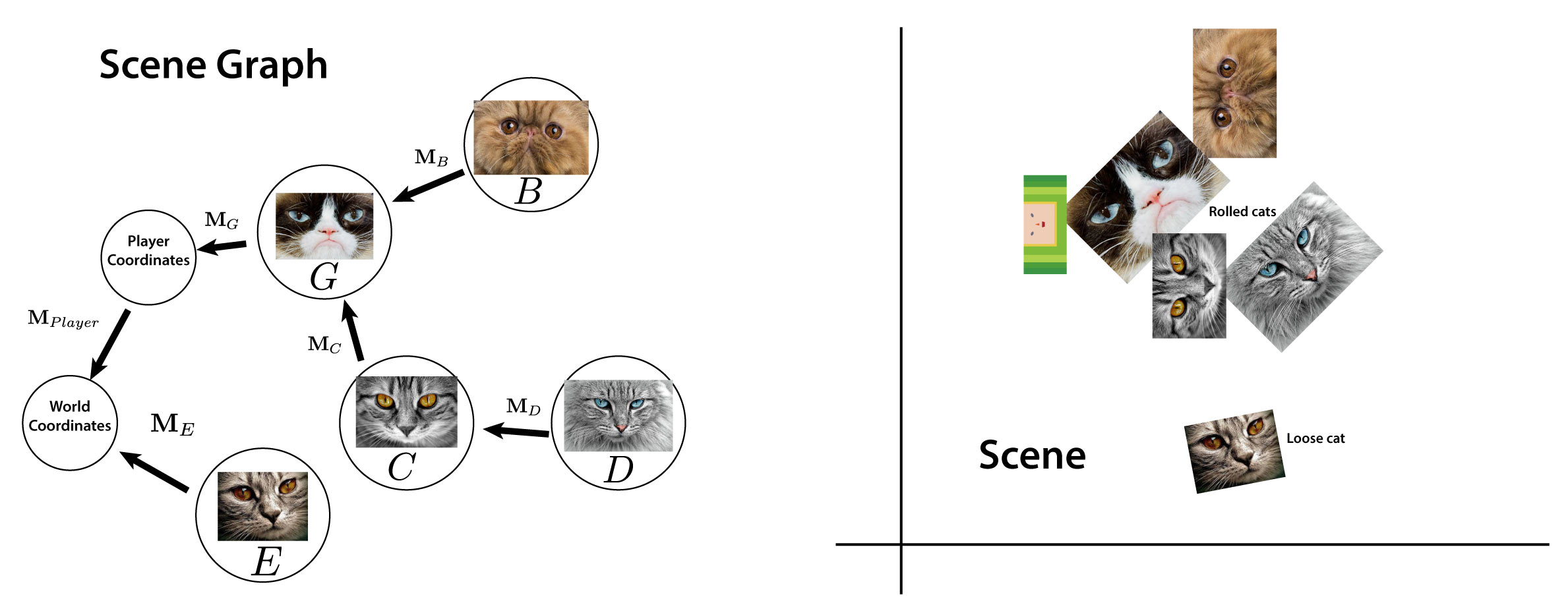
The scene graph is a hierarchy of coordinate systems rooted at the world coordinates of our scene, which are the coordinates we use to represent game logic (e.g., when we talk about the location of the player, it is implied that we are talking about a location in world coordinates). Our player and all of our cats each sit at their own respective node in the scene graph, which we will represent with subclasses of the Polygon2DModel class. Each of these node model subclasses has a model.transform attribute that represents the Mat3 transformation from that node's coordinates (the coordinate system where the vertices stored in that Polygon2D's model.verts are defined) to a parent node's coordinate system. Initially, all models have world coordinates as their parent. When a cat gets rolled up, though, this parent coordinate system will change. When the parent is no longer world coordinates, we will need to use a product of multiple transformations to get our polygon into world coordinates. That product will correspond to a path from our polygon to the world coordinates node in the scene graph.
Implement the function model.getWorldTransform():Mat3, which should return the matrix that transforms a model's vertices into world coordinates. You can use model.parent to get the parent of a model. The safest way to check whether the parent coordinate system is world coordinates or another node in our scene graph is to check whether the parent is another Polygon2DModel:
if((model.parent !== null) && model.parent instanceof Polygon2DModel){
    console.log(`model's parent is another node model!`)
}else{
    console.log(`model's parent is world coordinates!`)
}
-
getWorldTransform():Mat3
Part 3: Polygon Intersection
Now we have a way to transform the vertices of one polygon into the coordinate system of another. Use this and the LineSegment test you wrote in Part 1 to implement polygon collision detection.
To accomplish this, you will implement three functions in Polygon2D. For these functions, assume that the polygons already lie in the same coordinate system.
edgeAt(index:number):LineSegmenta helper function that gets the ith edge of a polygon and returns it as a line segment. Assume that the last edge index refers to an edge between the last vertex and the first vertex.getIntersectionsWithSegment(segment:LineSegment):Vec2[]a function that tests a polygon for intersections with a single line segment, returning all intersectionsgetIntersectionsWithPolygon(other:Polygon2D)a function that tests a polygon for intersections with another polygon (by testing all of the segments in that polygon), returning all intersections
-
edgeAt(index:number):LineSegment -
getIntersectionsWithSegment(segment:LineSegment):Vec2[] -
getIntersectionsWithPolygon(other:Polygon2D)
You should write the getIntersectionsWith function in Polygon2DModel such that it transforms the geometry of our two nodes into a common coordinate system before finding intersections. Also note that the intersections themselves will need to be described in some coordinate system. For this, please use world coordinates.
-
getIntersectionsWith(other: Polygon2DModel): Vec2[]
Part 4: Roll It Up
Now that we have a way to detect intersections, let's get rolling! Write the rollItUp(target:Polygon2DModel) function, which will test for intersection with another polygon and adds it as a child if an intersection is found.
The function adoptChild(newChild:Polygon2DModel) should be useful here:
    /**
     * Adds the provided Polygon2DModel as a child, and sets the child's parent to be this.
     * @param newChild
     */
    adoptChild(newChild:Polygon2DModel){
        newChild.reparent(this, false);
    }
Note that when one node becomes the child of another, its parent changes. And since the transform property of a node represents the transformation that maps its vertices to its parent, then this transform must change as well.
The fun of Katamari Damacy (and in our case, the moderate amusement of Catamari Damacy...) is that when you roll stuff up it makes the katamari (catamari) bigger, and the stuff you rolled can roll up more stuff. You can see how this works in the timeUpdate(t: number) function in CatamariSceneModel.ts:
const self = this;
// We are going to iterate over ALL of the cats.
for(let c of this.cats){
  // We are running this as the scene graph root object,
  // so if c.parent is `this` then it is a loose cat...
  if(c.parent === this){
    // Test for intersection with the player
    if(this.player.rollItUp(c)) {
      console.log("Cat captured by Prince!")
    }else{
      // If there is not an intersection with the player,
      // check to see if there is an intersection with any of
      // the player's descendants
      self.player.mapOverDescendants((capturedCat)=>{
        if((capturedCat as Polygon2DModel).rollItUp(c)){
          console.log("Cat captured by captured cat!")
        }
      })
    }
  }
}
-
rollItUp(target:Polygon2DModel):boolean
With that, roll up all of the cats!