Facade Layout Compiler
What was the goal?
The goal of this project was to design and implement a Facade Layout Compiler—a domain-specific compiler that transforms textual descriptions of building facades into verified, renderable outputs. The input language describes a facade as a symbolic grid of architectural elements (windows, doors, chimneys, spacing, and empty cells), and the compiler produces:
Verified layouts: The compiler performs static semantic analysis to enforce architectural constraints such as door placement rules, chimney connectivity, and optional window spacing requirements.
Renderable outputs: For valid programs, the compiler generates both SVG visualizations and structured JSON representations suitable for downstream processing or generative design workflows.
This project directly mirrors a traditional compiler pipeline—lexical analysis, parsing, semantic analysis, and code generation—but operates in a visually interpretable domain. The choice of architectural facades as the target domain was intentional: it provides immediate visual feedback for correctness, making it easier to reason about both the compiler’s behavior and the quality of its output.
Alignment with Proposal
My original proposal outlined three key deliverables:
- Custom DSL for facade specification: Implemented with support for row declarations, repeat expressions, compact syntax, comments, and rule declarations
- Static rule enforcement: Distinct semantic checks with error/warning classification
- Empirical validation through testing: pass a comprehensive test suite
The scope evolved slightly during implementation. More details are described in the sections below.
What did you do?
DSL Design
The facade DSL is designed as a minimal, domain-specific language for describing building facades as discrete 2D grids. Each facade is expressed as a set of numbered row declarations, where each row contains a sequence of symbolic elements:
E= empty spaceW= windowS= spacingD= doorC= chimney
Example program:
row 1: E E E E E E E E
row 2: E E E E E E E E
row 3: E W S S S S W E
row 4: E W S S S S W E
row 5: E E E D D E E E
This grid-based representation provides a clear correspondence between source-level specification and spatial layout. The choice of single-character symbols was deliberate: it enables the compact syntax feature (described below) while remaining visually scannable.
The row numbers aren’t strictly needed since the rows could just be inferred by order, but I was thinking that this would keep the language flexible for future extensions where it might be useful to refer to specific rows (e.g., changing row heights or other row-level attributes).
Expressiveness and Usability Features
To balance expressiveness with simplicity, the DSL supports several usability-oriented features:
-
Compact syntax: Symbols may be written without spaces (e.g.,
EWCWE), allowing concise row specifications. The lexer recognizes sequences of valid symbols and expands them into individual cells during tokenization. -
Repeat expressions: Elements can be repeated using
SYMBOL*COUNTsyntax (e.g.,W*5expands to five window cells). This significantly reduces verbosity for large facades and was particularly useful for stress testing. -
Zero-count repeats: The expression
E*0produces zero cells, effectively allowing conditional exclusion. This edge case required careful handling—the parser simply doesn’t add any cells to the AST rather than treating it as an error. -
Flexible whitespace and comments: Arbitrary whitespace (spaces, tabs, newlines) is permitted between tokens. Line comments starting with
#are ignored by the lexer. This allows users to format facade programs for clarity. -
Case insensitivity: Both
Eandeare valid (normalized to uppercase internally). -
Rule declarations: Optional rule declarations (e.g.,
rule min_window_spacing: 2) parameterize semantic checks. Rules are stored in the IR and consulted during analysis. -
Auto-fill behavior: Rows may have different lengths; the compiler automatically pads shorter rows with empty cells to create a rectangular grid. Auto-filled cells are tracked in metadata so users can distinguish compiler-inferred content from explicit specification.
Design Rationale
The DSL intentionally avoids geometric coordinates, numeric dimensions, or continuous values. By symbolic structure, the facade is described with a small set of symbols laid out on a grid, indicating relationships such as two windows sitting next to each other, without specifying exact dimensions or coordinates.
Front-End: Lexer and Parser
Lexer Implementation
I implemented a hand-written lexer that performs character-level scanning. The lexer maintains source location tracking (line and column) for error reporting.
-
Invalid character detection: The lexer explicitly rejects characters not in the DSL’s alphabet (punctuation, Unicode, emoji). This catches input errors immediately rather than propagating malformed tokens to the parser.
-
Negative number handling: Rather than tokenizing
-as a separate operator, the lexer detects the pattern-[digit]and reports “Negative numbers not allowed” directly. This provides clearer error messages than a generic parse error. -
Symbol sequence recognition: When the lexer encounters a multi-character word like
EWCWE, it checks if all characters are valid symbols. If so, it emits a singleIDENTIFIERtoken that the parser later expands. -
Error handling: Lexical errors are reported but do not prevent continued scanning. This allows the compiler to report multiple errors in a single pass.
Parser Implementation
The parser is a hand-written top-down parser that consumes the token stream and constructs an AST consisting of:
- program: The root node containing rules and rows
- rule_decl: A rule declaration with name and value(s)
- row_decl: A row with its number and list of cells
- cell: A single symbol at a source location
- repeat_expr: A symbol with a repeat count
Grammar (EBNF):
program     ::= rule_decl* row_decl+
rule_decl   ::= 'rule' IDENTIFIER ':' rule_value+
rule_value  ::= INTEGER | IDENTIFIER
row_decl    ::= 'row' INTEGER ':' cell+
cell        ::= SYMBOL | repeat_expr
repeat_expr ::= SYMBOL '*' INTEGER
SYMBOL      ::= 'E' | 'W' | 'S' | 'D' | 'C'
Note on Grammar Classification: This grammar is regular, and the structure is purely sequential without nesting. The language could equivalently be expressed as a regular expression:
(rule IDENTIFIER : rule_value+)* (row INTEGER : (SYMBOL | SYMBOL '*' INTEGER)+)+
Note on Parser Classification: The parser follows a top-down parsing strategy with one function per major grammar production (parse(), parse_rule(), parse_row(), parse_cells()). It is not strictly a recursive-descent parser because no function calls itself—the grammar’s repetition operators (* and +) are implemented with iterative while loops rather than recursive calls. This iterative approach is natural for a regular grammar where recursion is unnecessary. The parser uses single-token lookahead via check() to predict which production to apply, making it a predictive parser.
-
Error recovery: When a syntax error is detected (e.g., missing colon), the parser calls
sync_to_row()to skip tokens until the nextrowkeyword. This prevents cascading errors and allows multiple independent errors to be reported. -
Repeat expression handling: The
*0case is handled by simply not adding any cell to the AST—the absence of cells is the correct representation of “repeat zero times.” -
Duplicate row handling: When the same row number appears twice, the parser accepts both, only the latest duplicated row would show, and the semantic analyzer emits a warning. This is more user-friendly than treating duplicates as errors.
-
Strict validation: Row numbers must be positive integers. Syntax errors like
row -1:,row 1.5:, orrow :are caught and reported with helpful hints.
Middle-End: Semantic Analysis and Normalization
The semantic analyzer transforms the parsed AST into a normalized grid representation and enforces architectural constraints.
Grid Construction and Normalization
The analyzer builds a 2D grid from row declarations, filling any gaps in row numbering with empty rows and padding shorter rows with E cells to ensure a rectangular grid. Auto-filled cells are tracked in metadata to distinguish compiler-inferred content from explicit specification.
Architectural Rule Checks
- Door Rule (error): Door cells in each column must form a contiguous vertical segment extending to the ground floor.
- Chimney Rule (error): Each connected component of chimney cells (using 4-connectivity flood-fill) must reach the top row.
- Window Spacing Rule (warning): If
min_window_spacingis declared, adjacent windows in each row must meet the minimum horizontal distance. - Symmetry Detection (warning): Rows that differ from their horizontal mirror are flagged as asymmetric.
Structural violations (doors, chimneys) produce errors and halt compilation, while stylistic concerns (spacing, symmetry) produce warnings only.
Back-End: Code Generation
For valid programs, the compiler generates two output formats:
JSON Output
The JSON output includes:
- Grid metadata (dimensions, rules, auto-filled cells)
- The normalized grid as a 2D array of symbols
- Validation results (is_valid, errors, warnings)
This format is designed for programmatic consumption. The structured data can be used by downstream tools for further processing, constraint solving, or generative design.
SVG Output
The SVG generator produces a visual representation where each cell is rendered as a colored rectangle with a label. Cells are grouped by type in the SVG DOM, making it easy to style or manipulate specific element types.
PNG Rasterization
For environments that don’t support SVG, the compiler can produce PNG output via CairoSVG.
Example Facades:
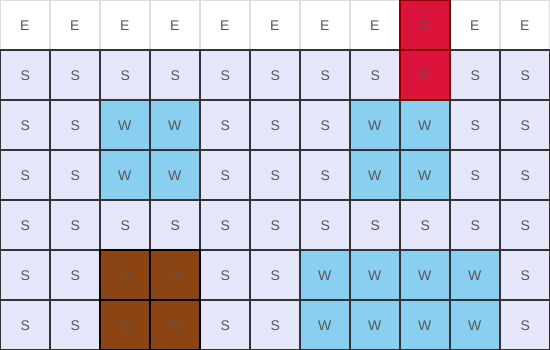
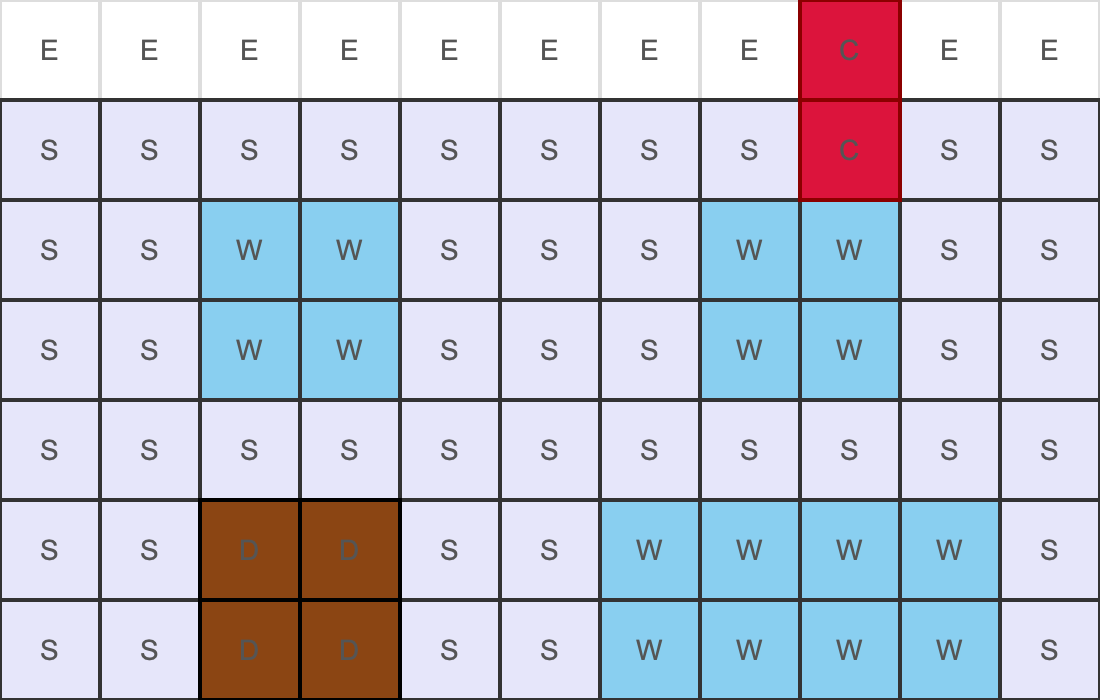
Version 1:
row 1: E E E E E E E E C E E
row 2: S S S S S S S S C S S
row 3: S S W W S S S W W S S
row 4: S S W W S S S W W S S
row 5: S S S S S S S S S S S
row 6: E
row 6: S S D D S S W W W W S
row 7: S S D D S S W W W W S
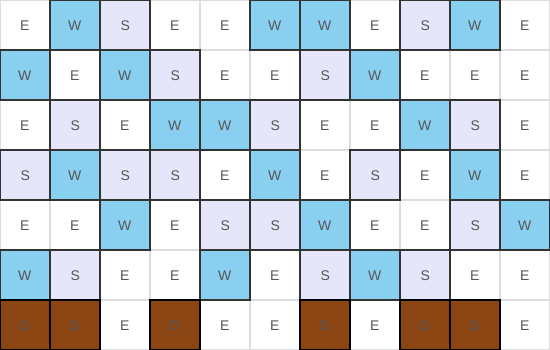
Version 2:
row 1: E W S E*2 W W E S W E
row 2: W E W S E E S W E*3
row 3: E S E W*2 S E E W S E
row 4: S W S S E W E S E W E
row 5: E E W E S*2 W E E S W
row 6: W S E E W E S W S E E
row 7: D*2 E D E E D E D*2 E
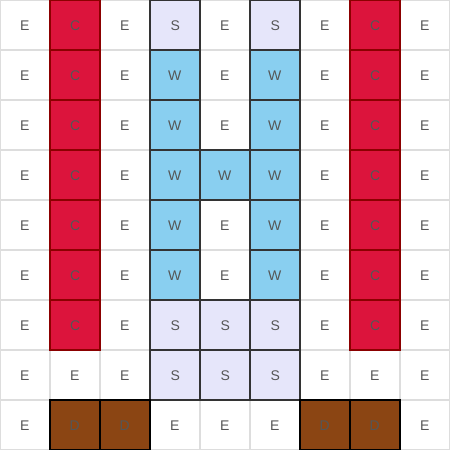
Version 3:
row 1: E C E S E S E C E
row 2: E C E W E W E C
row 3: E C E W E W E C
row 4: E C E W W W E C E
row 5: E C E W E W E C E
row 6: E C E W E W E C
row 7: E C E S S S E C E
row 8: E E E S S S
row 9: E D D E E E D D E
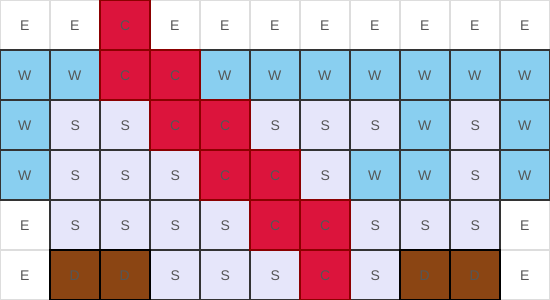
Version 4:
row 1: E E C E*2
row 2: W W C C W W W W W W W
row 3: W S S C*2 S S S W S W
row 4: W S S S C C S W*2 S W
row 5: E S*4 C C S S S
row 6: E D D S*3 C S D D
Version 5:
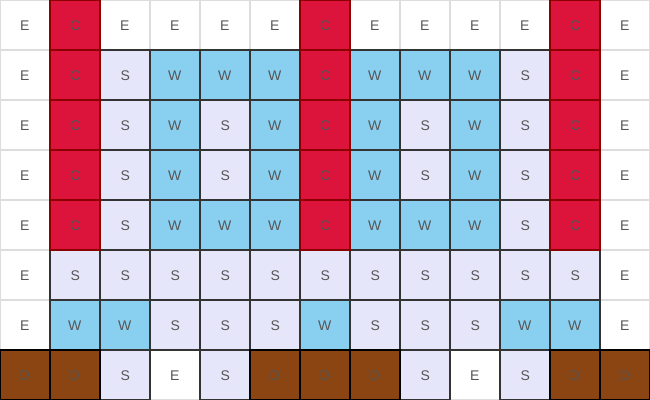
row 1: E*1 C*1 E*4 C*1 E*4 c*1 e*1
row 2: E*1 C*1 S*1 W*3 C*1 W*3 S*1 c*1 E*1
row 3: E*1 C*1 S*1 W*1 S*1 W*1 C*1 W*1 S*1 W*1 S*1 C*1 E*1
row 4: E*1 C*1 S*1 W*1 S*1 W*1 C*1 W*1 S*1 W*1 S*1 C*1 e*1
row 5: E*1 C*1 S*1 W*3 C*1 W*3 S*1 C*1 E*1
row 6: e*0 E*1 S*11 E*1
row 7: E*0 E*1 W*2 S*3 W*1 S*3 W*2 E*1
row 8: E*0 D*2 S*1 E*1 S*1 D*3 S*1 e*1 s*1 d*2
What were the hardest parts to get right?
1. Error Classification
I classified errors by compiler phase: lexical errors for invalid characters (e.g., @, emoji), syntax errors for malformed constructs (e.g., missing colons), and semantic errors for valid syntax with invalid meaning (e.g., floating doors, unknown symbols like X).
2. Chimney Connectivity Analysis
Initially, I tried a simple positional check (e.g., chimney cells must be on the top row). This failed for common patterns where chimneys are connected and continuous to reach the ground:
row 1: C E E
row 2: C C S
row 3: S C C
row 4: S S C
This chimney is valid. It connects to the top through a diagonal path. The flood-fill approach correctly handles this by treating chimneys as connected components rather than isolated cells.
A subtle bug emerged with multiple chimney components: the algorithm must check each component independently, not just verify that some chimney reaches the roof.
3. Normalization Without Hiding Bugs
Auto-filling rows and padding widths improved usability but introduced a risk: it could mask user errors. If a user forgets a cell, the compiler silently adds an empty cell, which potentially hiding bugs.
I addressed this by:
- Explicitly tracking auto-filled cells in metadata
- Emitting INFO messages about auto-fill actions
- Including auto-fill information in JSON output
This makes compiler intervention visible without treating it as an error.
4. Error Recovery and Multiple Error Reporting
I implemented basic error recovery so the compiler can report multiple errors in a single pass: the lexer reports invalid characters but continues scanning, and the parser skips to the next row after encountering a syntax error.
6. Comprehensive Test Coverage
The most time-consuming aspect was ensuring comprehensive test coverage. My initial tests covered obvious paths but missed edge cases like:
E*0in various positions- Mixed case symbols
- Comments in unusual positions
- Unicode in comments (valid) vs. Unicode in code (invalid)
- Multiple errors in the same program
I used an LLM as a test ideation tool: after implementing a feature, I asked it to propose adversarial inputs and edge cases. I then checked and determined the expected behavior and added these cases to my test suite.
Were you successful?
Quantitative Evaluation
The testing results printout is available in test.txt
Test Suite Composition
The test suite comprises 146 facade programs organized into 22 categories:
| Category | Tests | Description |
|---|---|---|
| Basic | 5 | Simple valid inputs |
| Syntax | 11 | Syntax variations (compact, repeat, case) |
| Comments | 4 | Comment handling |
| AutoFill | 5 | Auto-fill behavior |
| RowNum | 5 | Row number handling |
| Rules | 4 | Rule declarations |
| Door | 8 | Door structural validation |
| Chimney | 8 | Chimney connectivity validation |
| WinSpace | 4 | Window spacing rule |
| BadChar | 18 | Invalid character detection |
| BadSymbol | 6 | Invalid symbol detection |
| SyntaxErr | 18 | Syntax error handling |
| Edge | 10 | Edge cases |
| Complex | 4 | Complex valid facades |
| Boundary | 4 | Boundary conditions |
| WS | 5 | Whitespace edge cases |
| BadSymbol2 | 6 | Additional invalid symbol tests |
| Stress | 5 | Stress tests (large grids, many rows) |
| Recovery | 3 | Error recovery |
| Combo | 4 | Feature combinations |
| ZeroRepeat | 9 | Zero-count repeat expressions |
All 146 tests pass.
Stress Test Results
The compiler handles extreme inputs without issues:
- 100-column rows
- 100-row facades
E*9999(large repeat)E*500repeated 10 times
Additional Experiment
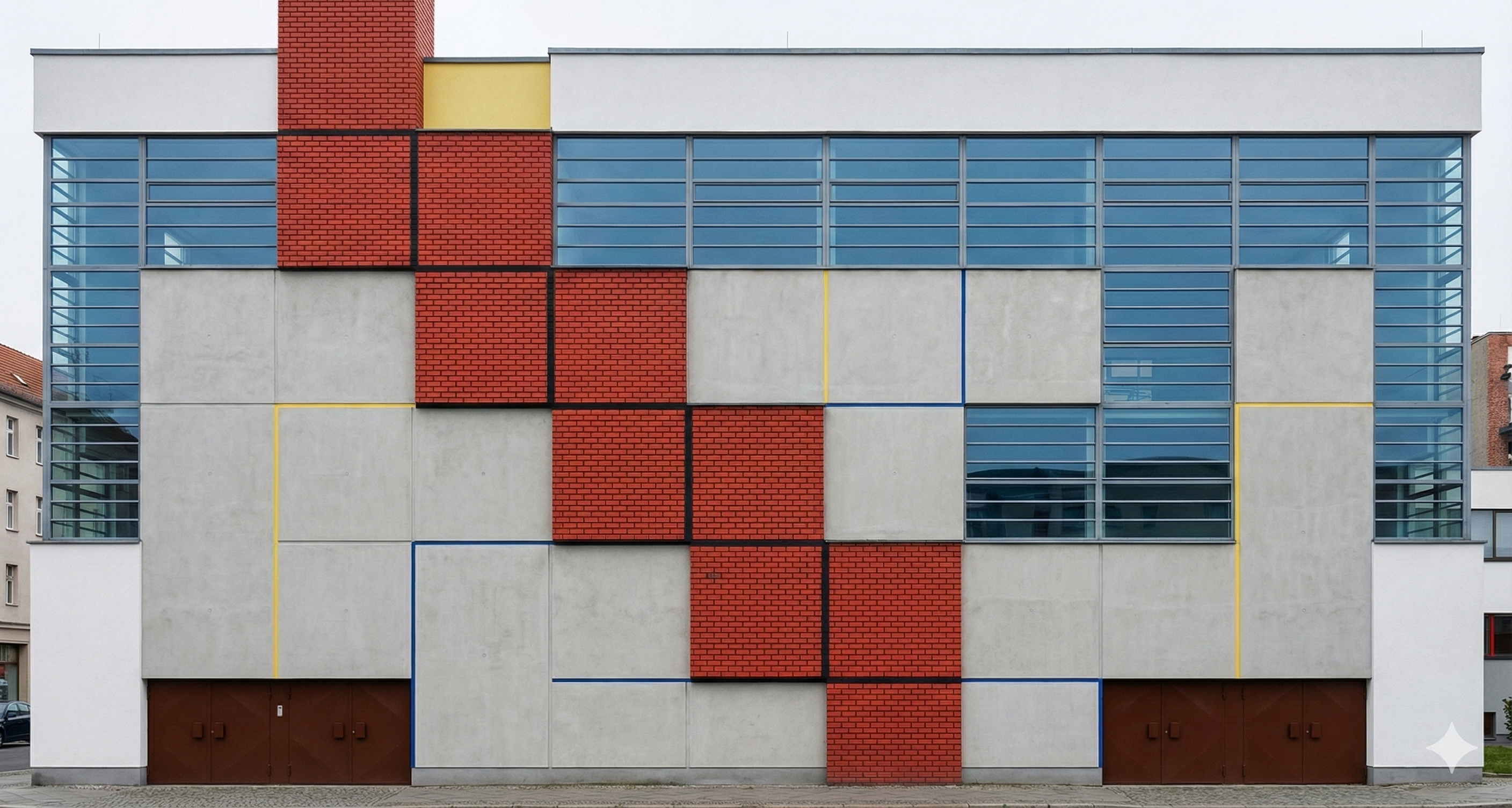
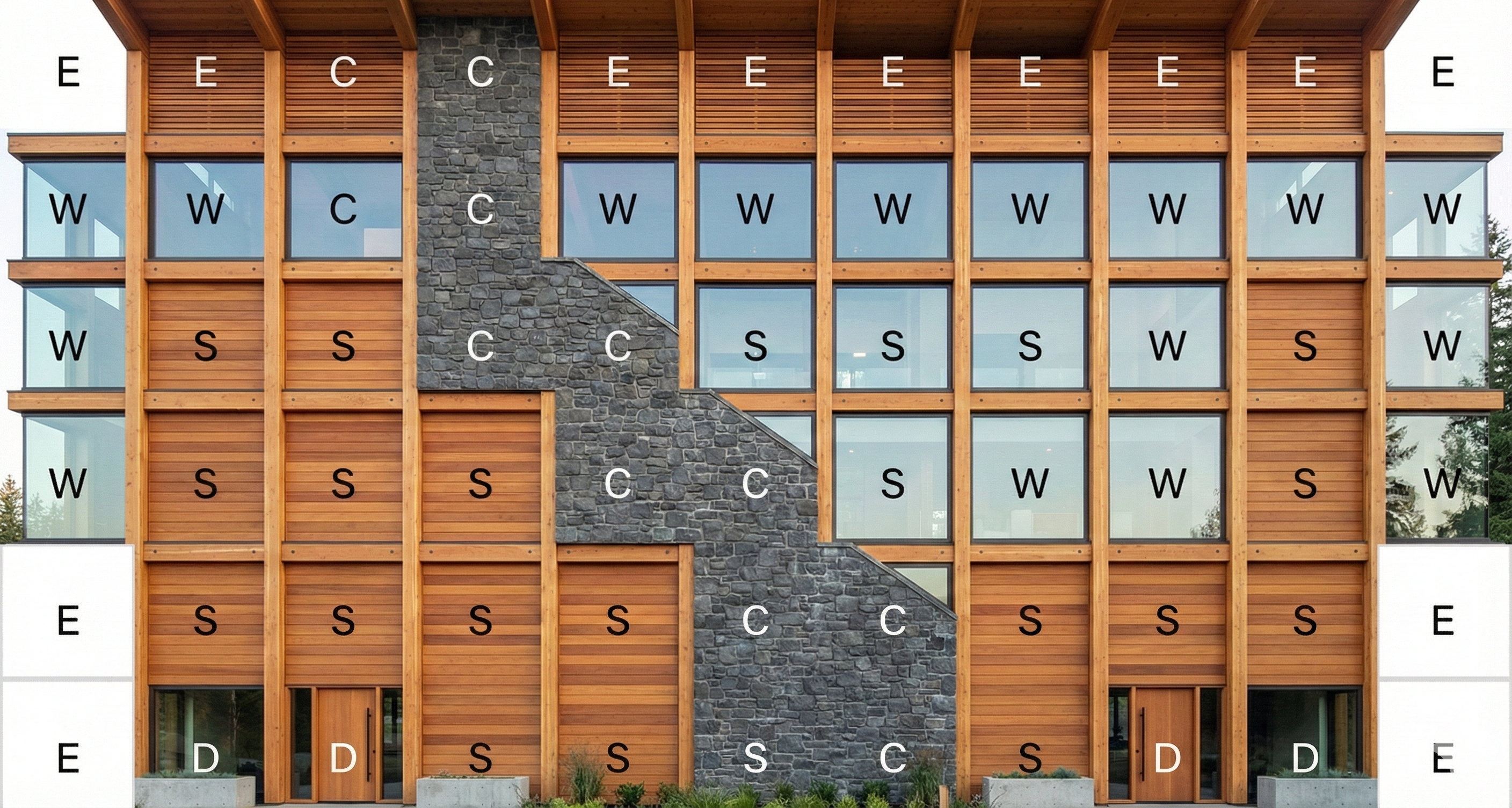
I conducted an experiment using an image generation model (Nano Banana) to produce photorealistic facade images from compiled layouts. The workflow:
- Compile facade DSL → JSON + SVG (+ PNG)
- Construct prompt from grid structure and style description
- Generate image using multimodal model
Text prompt format: Generate a [-style] facade of a [low-rise/mid-rise/high-rise] building based on this image, where W = window, D = door, S = spacing, E = empty, and C = chimney.
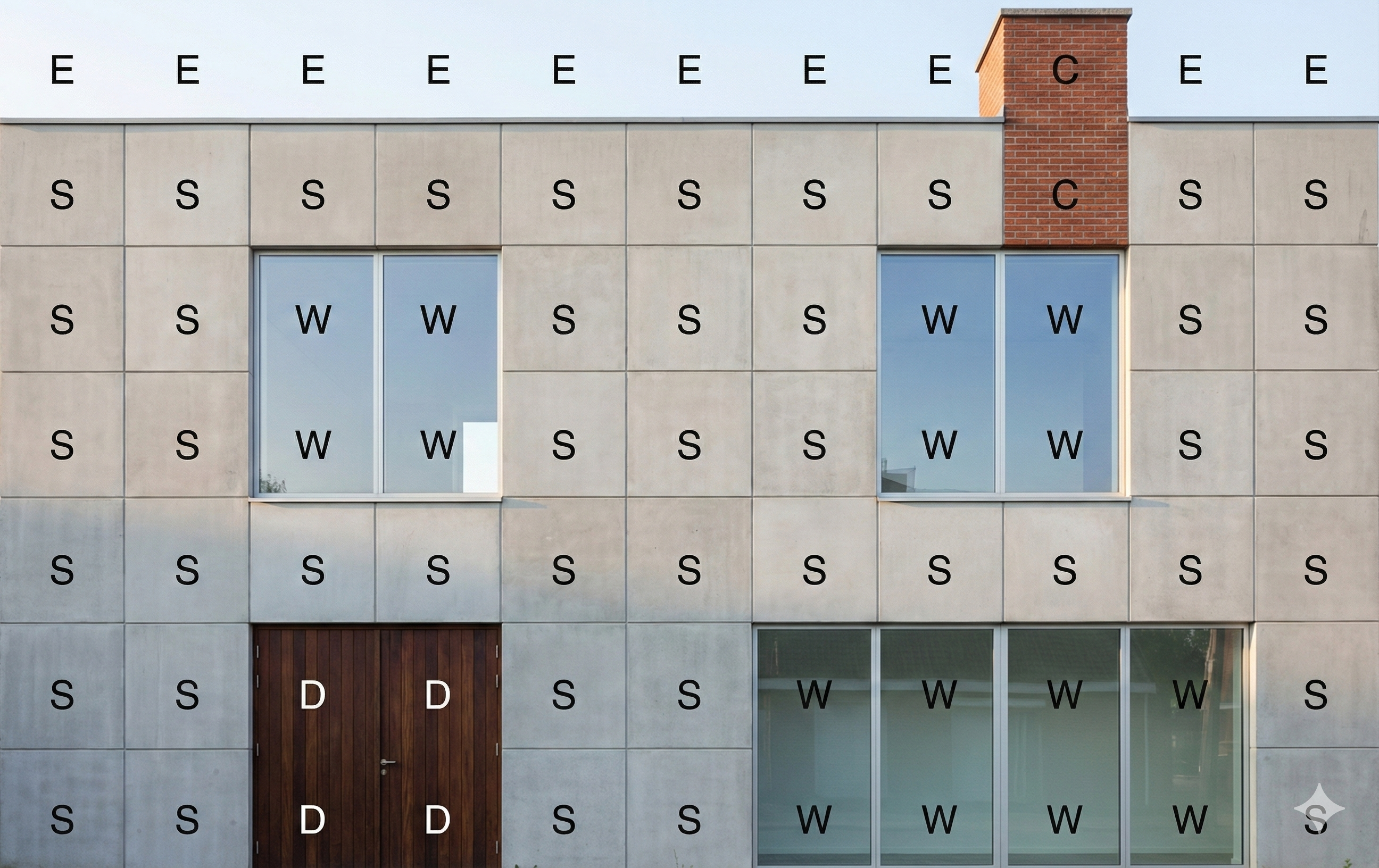
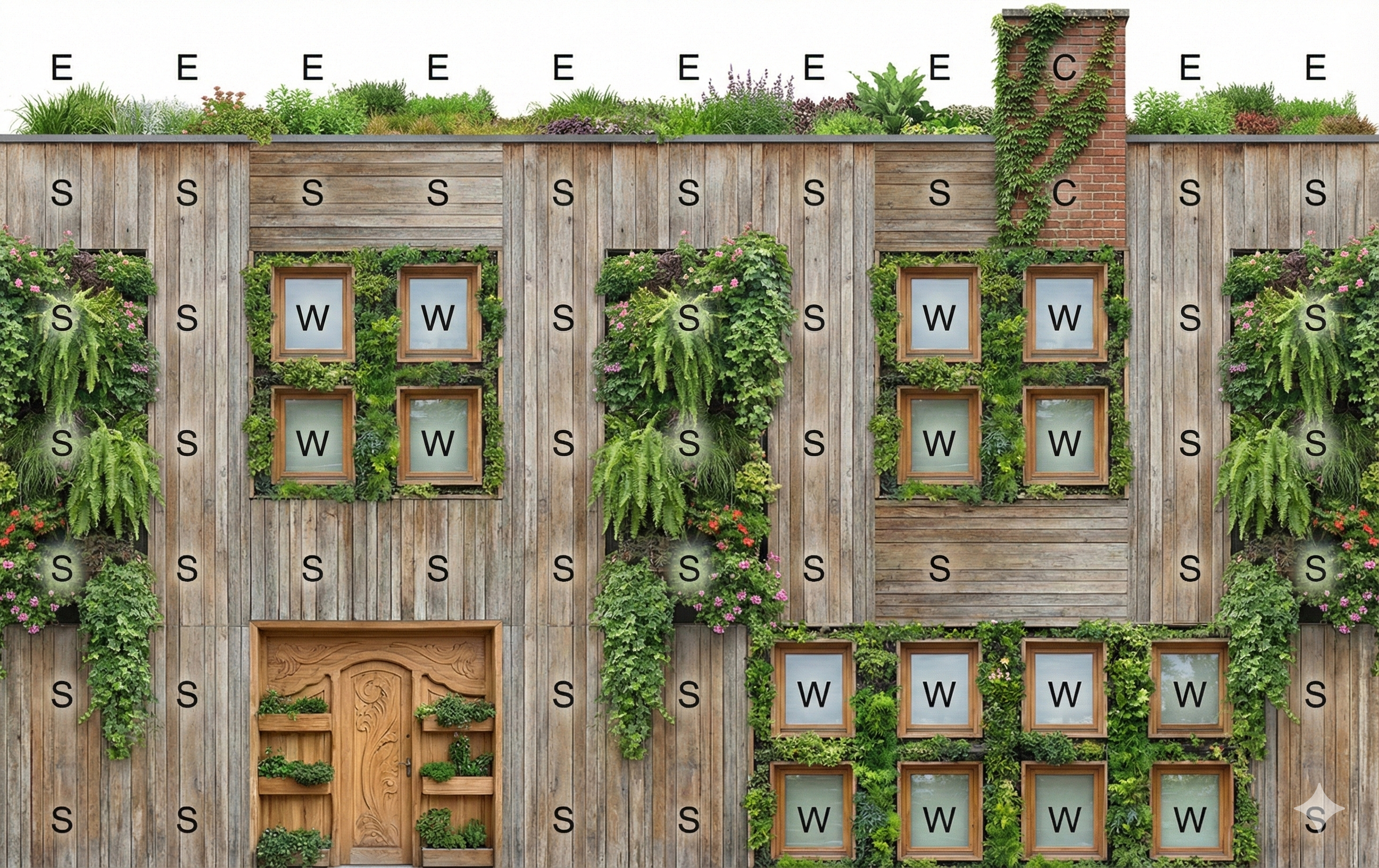
The results were correct most of the time. The model understood the general layout but sometimes struggled with precise spatial positioning. This suggests the compiled output could serve as input for generative design, though current models may need additional guidance.
Facade Example 1:
PNG output:
Modernist-style:
Biophilic-style:
Postmodern-style:
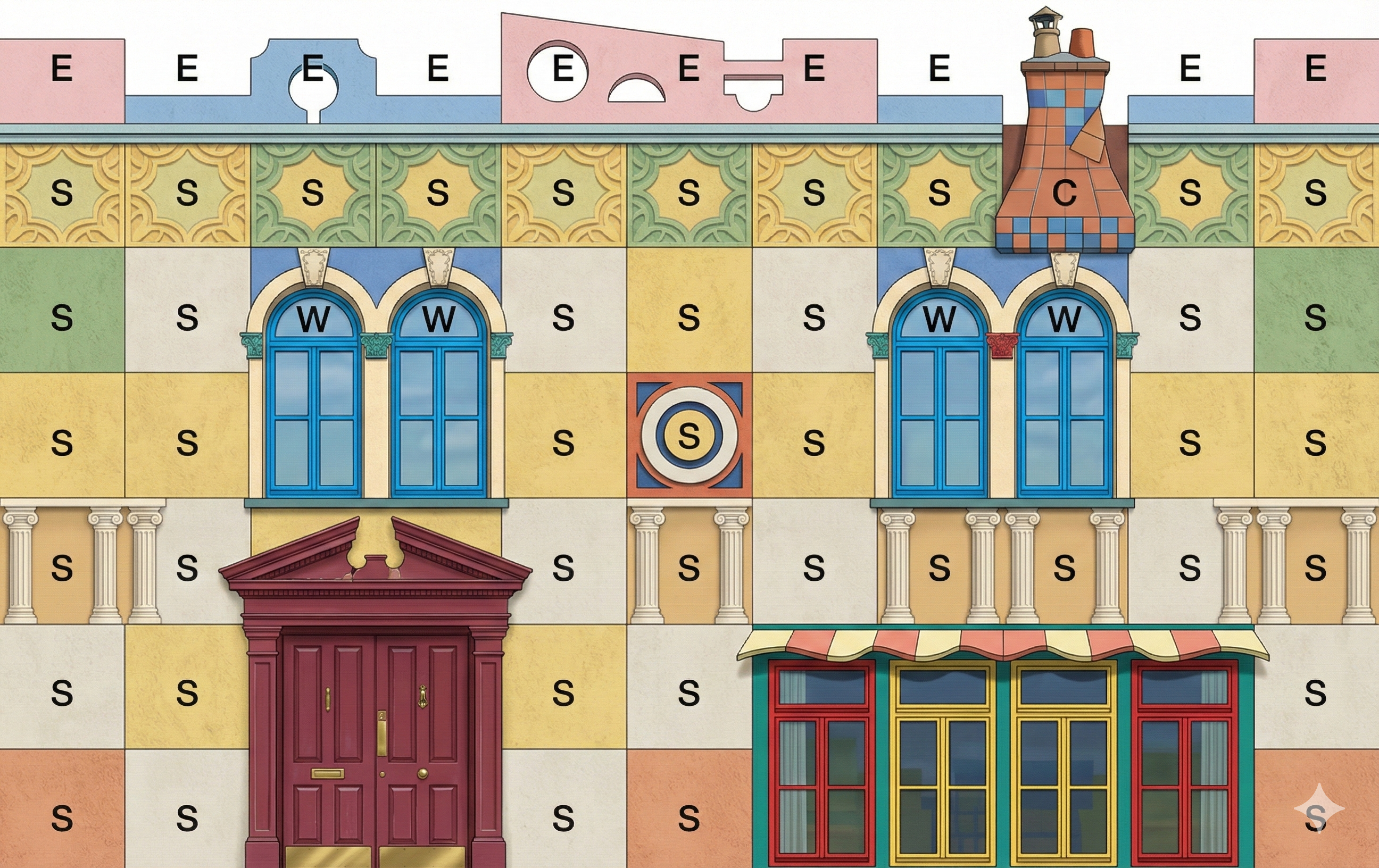
Facade Example 2:
PNG output:
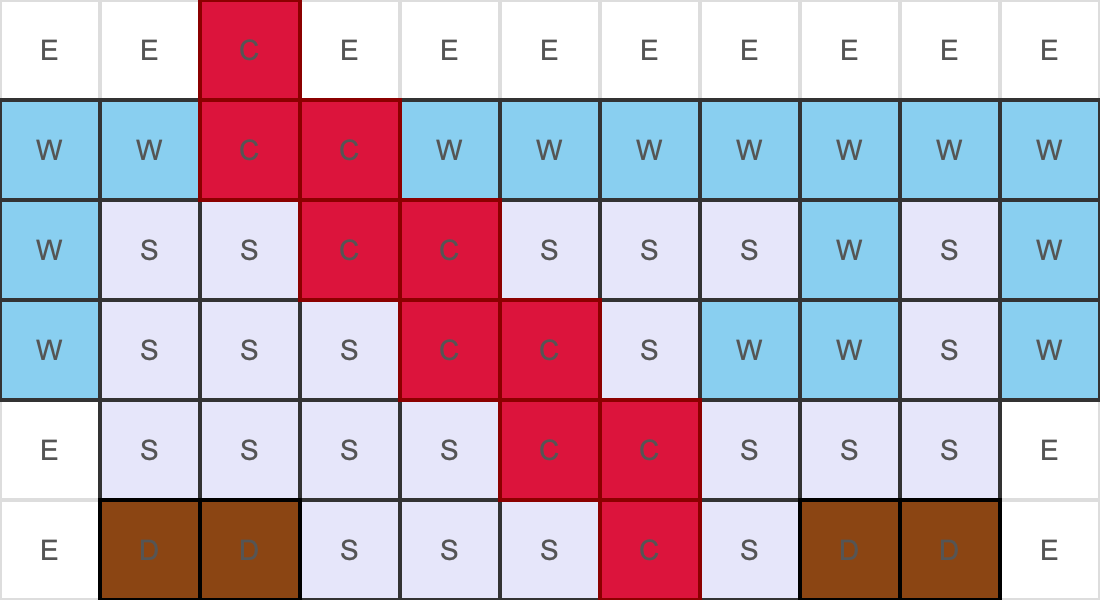
Bauhaus-style:
Neo-Futurist-style:

Post-and-Beam Modern-style:
Qualitative Validation
I output 5 facade examples (json, svg, png) together with image gen visualizations which are available in the example folder.
Conclusion
This project shows that the classical compiler pipeline—lexing, parsing, semantic analysis, and code generation—maps cleanly onto domain-specific languages, even in nontraditional domains such as architectural layout. Treating facades as programs rather than data made it possible to enforce structural invariants that would be difficult to express or validate in other formats.
Building the compiler highlighted several practical lessons: DSL design requires careful trade-offs between expressiveness and complexity; high-quality error messages are essential for usability; and comprehensive testing is challenging in the absence of established benchmarks, requiring systematic, feature-driven test design. The phased architecture proved especially valuable for debugging and extension, as clear phase boundaries made errors easy to localize and new features straightforward to add.
Overall, this experience reinforced the power of compiler techniques as a general problem-solving framework. The resulting facade compiler provides a solid foundation for future extensions, such as richer architectural constraints, integration with generative design systems, or interactive feedback during editing.
It was a great semester, even though I was personally juggling a lot. Coming from a very different background, I learned a lot from this course and developed a better understanding of what a compiler is and how it works. Thanks to everyone for the great online and in-class discussions, and especially to Adrian and Kei for the guidance and help throughout the semester.