CS 4414/5416:
Systems Programming
Inter-Process Communication
David Bindel
2026-10-08
Logistics
Upcoming
- P3 (minishell) due Monday, 10/19
- Lab 7 is Friday: building pipelines
- No class 10/19 - Fall Break!
Recap
Where We Are
This module: Unix abstractions
- Basic abstractions (files, pipes, virtual memory)
- Processes and inter-process communication
- Introduction to TCP sockets
(Yes, some overlap with 3410/4410.)
This Week
- Tue: processes and IPC intro
- Today:
- Case studies in IPC
- Using anonymous and named pipes
- Using Unix domain sockets
- A hint of shared memory IPC
- Fri: lab on Unix pipelines
Case Studies
Many Possible Architectures!
Different ways to organize; for each, let’s talk:
- What are the advantages to this approach?
- What are potential disadvantages and limits?
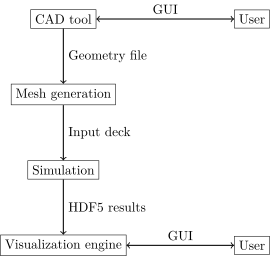
Simulation Workflows
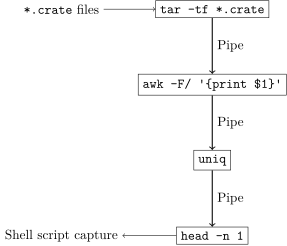
Unix Shell Pipelines
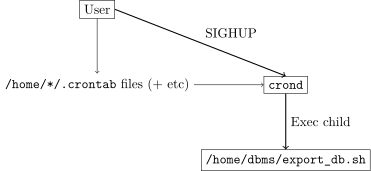
Cron Daemon (System V)
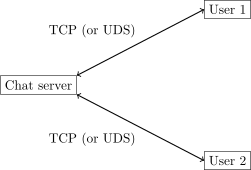
Chat Server
Jupyter Notebooks
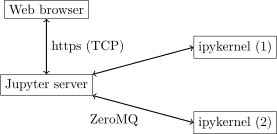
- Jupyter Spawner launches kernels (not shown)
- ZeroMQ runs over several transport layers
Pipes and FIFOs
A User Perspective
Pipe properties:
- Unidirectional: writer output to reader input
- Bidirectional pipes are supported a few places
- Ordered (FIFO), streaming data (vs messages)
- Afford limited internal buffer capacity
Anonymous vs Named
mkfifocreates a named pipe (FIFO) inode- Anonymous pipes may involve vnode, but not inode
- Data still managed by kernel ring buffer
- Data doesn’t go through disk!
Communication via Named Pipes
- Can connect named pipes from the command line
- Can use with things like
cat - Great for debugging!
Front-end/Back-end
Common design case:
- Front-end GUI or CLI for user interaction
- Back-end engine handles heavy compute
- Defined protocol for connecting the two
- Allows mix-and-match: multiple GUIs and engines
One implementation: two processes talk over pipes
Example: Stockfish
- Stockfish is a strong open-source chess engine
- Interaction via Universal Chess Interface (UCI)
- En Croissant and other GUIs spawn Stockfish with communication pipes
Common Design Issues Revisited
- How do we maintain consistent distributed state?
- How do we track software version inconsistencies?
- How do we handle partial failure?
- How do we debug issues?
- What’s with all the buffers?
Let’s talk through this with Stockfish!
Consistent State
- Both GUI and engine maintain play state separately
- Command
ucinewgameto start a new game - Command
positioncan make move or re-describe board - Stockfish checks move validity just in case!
Versioning
- The
ucicommand is run at the outset - Engine responds with
idandoptioncommands to GUI - Engine concludes with
uciok - GUI will kill engine if no
uciokby timeout
Partial Failures
- GUI can detect child termination with signals
- What about hang vs long computation?
isready/readyokto check if ready for commandsstopto ask engine to stop current thinking ASAP
Debug Issues
- Can tell Stockfish to keep a log!
- Can also run Stockfish from command line interface
- UCI is a text protocol!
Buffering
Stockfish is C++ vs Rust, but:
- Uses
std::endlto flush buffers when appropriate - Uses specialized synchronized versions of standard streams
- This is mostly about thread safety
- Have special
sync_coutandsync_endlfor this
An Aside
Lab 7 will use named pipes with
- Server that registers clients and sends broadcasts
- Client can be just
cat < client-pipe
Ask Me a Question!
Unix Domain Sockets
Socket Concept
Socket is a thing you connect to
- Don’t scream into the void – talk to someone!
- Can have multiple simultaneous connections
- This is unlike pipes
- Once connected, can communicate
Streams and Datagrams
- Stream as phone call
- Reliable, ordered stream
- Similar to style of paired FIFOs
- Datagram as mail
- Unreliable, unordered messages
Create, Bind, Listen, Accept
On the server side (for Unix or TCP sockets):
- Create the socket
- Bind socket to a name
- Hard for clients to connect otherwise!
- Make sure name is not already used
- Listen for connection requests
- Accept to get new descriptor for a connection
Rust Interface
use std::os::unix::net::UnixListener;
use std::io::Write;

fn main() -> std::io::Result<()> {
    let args: Vec<String> = std::env::args().collect();
    let listener = UnixListener::bind(&args[1])?;
    let mut ticket = 0;
    for stream in listener.incoming() {
        let Ok(mut stream) = stream else { continue; };
        writeln!(stream, "You get ticket #{ticket}")?;
        ticket += 1;
    }
    Ok(())
}
Unix Streams
This is a stream socket
- Bidirectional - available for read and write
- Reliable - won’t silently lose data
- Ordered
Use std::os::unix::net::UnixDatagram for datagrams
Client Connections
Close and Shutdown
UnixStreams are closed ondrop- Close blocks until all data transmitted
- Can also call
shutdown(immediate return)- Takes argument:
Read,Write, orBoth
- Takes argument:
- All also true for TCP streams
Comparison: Windows Named Pipe
A lot like a Unix socket!
- But different library interfaces
- Names in a pseudo-filesystem (no inode)
- Unidirectional or bidirectional (half-duplex or full-duplex)
- Can go over network (Server Message Block protocol)
Poll Everywhere!
Which is true of both named pipes and Unix sockets?
- Communication is bidirectional
- Naming goes through the file system
- A single pipe/socket can be used by multiple clients to talk to a server simultaneously
- Communication can be datagram- or stream-oriented
Respond at: https://PollEv.com/davidbindel252 or send davidbindel252 to 22333
Shared Memory
Why Do This?
- Shared memory can have zero copies through buffers!
- Can be much more efficient for large messages
Why Not?
It’s a tremendous pain to get right! Manage
- Protocol to set up shared pages
- Protocol for synchronizing reads/writes
- Proper alignment on allocations
shmipc
shmipc Cartoon
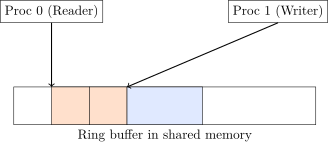
- Writer requests allocation from ring
- Reader accesses parts no longer written
- Atomic/sequentially consistent pointer updates
Ask Me a Question
Wrap-Up
Summary
- IPC enables a variety of architectures
- Several low-level mechanisms: pipes, sockets, shmem
- Can wrap these with higher-level abstractions
Up Next
- Fall Break!
- No lecture Tue, 10/13
- Adrian Sampson on 10/15 - intro TCP sockets
- No Bindel OH next week
- P3 final due 10/19
- Lab 7 tomorrow: using Unix pipes
Outro
Enjoy your break!