
OS Processes
So far in 3410, we have been operating under the ridiculous notion that a computer only runs one program at a time. A given program gets to own the computer’s entire memory, there is only a single program counter (PC) keeping track of a single stream of instructions to execute.
You know from your everyday computing life that this is not how “real” computers work. They can simultaneously run multiple programs with their own instructions, heap, and stack. The operating system (OS) is, among other responsibilities, the thing that makes it possible to run multiple programs on the same hardware at the same time. The next part of the course will focus on this mechanism: how the OS and hardware work together to work on multiple things concurrently.
Executable vs. Process
When you compile the C code you have written this semester, an executable file is produced. This is a file that contains the instructions (i.e., machine code) and data for your program. An executable is inert: it’s not doing anything; it’s just sitting there on your disk. You can copy an executable, rename it, attach it to an email, print it out, put it on a USB drive and send it through the US mail—anything you can do with any other file.
When you run an executable, that creates a process. A process is a currently running instance of a program. You can run the same executable multiple times and get multiple, concurrently executing processes of the same program. The different processes will share the same instructions and constant data, but they will have different heaps and different stacks (so different values of all their variables, potentially). It’s not just a file—you can’t print out a process or burn it to a CD. A process is something that occurs on a specific computer at a specific time.
Time Multiplexing
How can one processor run multiple processes simultaneously? The plan is time multiplexing: in other words, the processor will only run instructions from one process at a time, and we’ll periodically switch which process is currently active. You can visualize this with a timeline that is chopped up into little pieces, where each piece represents a period of time where the processor is executing a certain process.
In addition to ordinary processes, we will also make time for the processor to run instructions from the operating system itself. This code is special and will be called the OS’s kernel. The kernel is just a program (i.e., it’s made out of machine code instructions like any other program), but it’s a program that runs in a special mode so it can supervise all running processes. So in that timeline you might be using to visualize this idea, you can imagine that the kernel runs for little slices of time between the times when proper processes run.
The goal in this paradigm is to provide processes with the illusion that they own the entire computer. During one of the time slices when the processor is running a given process, that process “owns” the processor and doesn’t have to worry about any other processes that might be running. That means:
- A process gets to use all of the machine’s registers.
- The program counter so appears to proceed normally through the program’s instructions. Even across slices of time where a given process executes, the OS will save and restore the PC so the process “thinks” it has been running continuously.
- Through a mechanism called virtual memory, every process gets the illusion of owning the entire \(2^{64}\)-byte memory address space. (Virtual memory will be covered later during the semester.)
Note
For now, we’re assuming a computer with a single CPU core. We’ll consider multiprocessor and multicore machines later on.
The Process Lifecycle
To reiterate, the OS kernel is the software that manages all the processes running on a machine. This section is about how the kernel does that.
The kernel keeps track of all the processes on the system (running or not) in a process list. Each process gets an entry in this list called a process control block (PCB). The PCB is a data structure that contains all the information about a process that is necessary to run it. The details of what goes into a PCB differ between OSes, but here are some necessary ingredients:
- Basic identifying information about the process, like the user who launched the process and the path of the executable file where the code comes from.
- State, i.e., the contents of all of the registers (when the process is not currently running). The kernel will restore the values of all the registers, including the PC, when it’s time to resume executing the process.
- Scheduling status. Whenever it’s time to switch processes, the kernel will use the status of all processes to decide which process to run next.
To understand the lifecycle of a process, let’s look closer at the last component: the scheduling status. You can think of the process’s status as forming a state machine, which would look something like this:
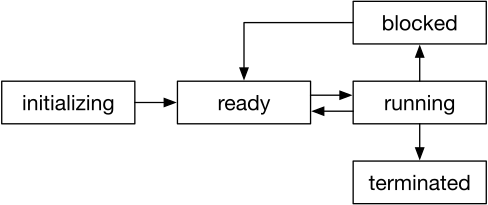
Let’s step through a process’s lifecycle.
Imagine that you run a program by typing ./myprog.
Here’s what the OS needs to do:
- Create a new PCB for the process, in the initializing state, and add it to the process list.
The OS sets up the memory for the process.
Here are some process-setup tasks the OS must do:
- Read the instructions from the executable file and put them into the text segment in memory. Set the process’s saved program counter to point to the first instruction in the
mainfunction. - Allocate space for the stack. Create a stack frame for
main, and set up the arguments tomain. Set the process’s stack pointer (savedspregister value) to point here.
- Read the instructions from the executable file and put them into the text segment in memory. Set the process’s saved program counter to point to the first instruction in the
- When everything’s ready, move the process to the ready state to indicate that—whenever there is time available—the process could start running.
- Periodically, the OS interrupts the currently running process and switches to a new one. The old process goes from running to ready, and the new process goes from ready to running. (See the next section for details on this mechanism.)
- Running processes might request some sort of task from the kernel, such as I/O on a disk or network. These processes become blocked until their request is satisfied, at which point they become ready again.
- Eventually, a process finishes: for example, by returning from
mainor callingexit. The OS transitions the PCB to a terminated state.
Context Switching
Many processes may be active at the same time, i.e., they may all have PCBs that are all ready. However, only one process can actually be running at a time. To give the illusion that multiple programs are running on your computer at the same time, the OS chooses some process to run for a short span of time, and then it pauses that process and switches to a different process. While the length of these time windows varies by OS and according to how busy the computer is, you can think of them happening every 1–5 ms if it helps contextualize the idea. The OS aims to give a “fair” amount of time to each process.
The act of changing from running one process to running another is called a context switch. Here’s what the OS needs to do to perform a context switch:
- Save the current process state. That means recording the current CPU registers (including the program counter) in the process’s PCB.
- Update the current process’s status in its PCB from running to ready.
- Select another process. (Picking which one to run is an interesting problem, and it’s the responsibility of the OS scheduler.)
- Update that PCB’s status from ready to running.
- Restore that process’s state: load the previously-saved register values from the PCB back into the register file.
- Resume execution by jumping to the new process’s current instruction, i.e., the saved value of the program counter.
Context switches are not cheap. Again as a very rough estimate, you can imagine them taking about a microsecond, or something like a thousand clock cycles. The OS tries to minimize the total number of context switches while still achieving a “fair” division of time between processes.
Scheduling
When a context-switch happens, the kernel has to decide which (of all the processes with ready status) to run next. The policy for deciding this is called the scheduling policy. It is an extremely important factor in the overall performance of a system. Scheduling policies are hard to design because they have to balance many competing demands, such as:
- Fairness: We want every process to have a roughly equal share of the CPU cycles.
- Turnaround time: When a process has a certain amount of work to do, we want to minimize the amount of time between when that task starts and when it finishes.
- Responsiveness: When a relevant event happens in the outside world (e.g., the mouse moves or a network packet arrives), we want processes to have a chance to deal with that event quickly.
Designing a good scheduler is the subject of a great deal of research and engineering effort. We will not cover scheduling policies in this course, but if you want to learn more, I recommend chapters 7–9 of the free Operating Systems: Three Easy Pieces textbook.
Kernel Space & User Space
Recall that the OS kernel is a special piece of software that forms the central part of the operating system. You can think of it as being sort of like a process, except that it is the first one to run when the computer boots and it has the special privilege of managing all the actual processes. The kernel has its own instructions, stack, and heap.
Systems hackers will often refer to a separation between kernel space and user space.
OS stuff happens in kernel space: maintaining the PCBs, choosing which processes to run, and so on.
All the stuff that the processes do (every single line of code in myprog above, for instance) happens in user space.
This is a cute way to refer to the separation of code and responsibilities between the two kinds of code.
However, there is also an important difference in privileges:
we need to give kernel-space code unrestricted access to all of the computer’s memory and to I/O peripherals.
It can read and write the memory of any process.
In user space, we want each process to have access only to its own memory.
A user process must ask the kernel nicely to perform things like I/O or to communicate with other processes.
Privilege Levels
How will we enforce this difference in privileges? We can’t do it in software alone; we need to completely remove the ability for user-space code to do some things (e.g., execute certain instructions or access certain memory), even when that code is malicious. We can’t simply trust programs to avoid that dangerous functionality.
Processor ISAs provide a mechanisms to enforce restrictions. To implement this separation, the ISA defines a series of privilege levels, a.k.a. modes, a.k.a. protection rings. Different capabilities (e.g., different instructions) are available in each mode. The ISA provides mechanisms for switching between modes and, critically, takes great care to ensure that switching to a higher mode is always done in a carefully controlled way.
For example, RISC-V has a special set of privileged instructions and registers that only kernel-space code is allowed to use. In RISC-V, the kernel runs in supervisor mode, which grants access to this privileged functionality. You can think of the CPU as starting in this mode and starting to execute the kernel. When the kernel decides to run a user-space process, it first switches to a less-privileged mode called user mode.
Transitions Between Kernel Space and User Space
Let’s return to our imaginary timeline that depicts time-multiplexed sharing of a CPU. You can visualize it as having many big chunks of time when one of several user-space processes run, separated by short little slices of time where the kernel runs. This section is about how the transitions work from user space to kernel space and vice versa.
Kernel Space to User Space
This direction is pretty straightforward: the ISA provides a way for the kernel to explicitly instruct the CPU to drop to a lower privilege level before it jumps to user code. This is always safe because it involves voluntarily giving up privileges, never acquiring new privileges.
In RISC-V, the mechanism involves either writing to a special privileged control status register (CSR)
or using a special sret instruction.
User Space to Kernel Space
There are two ways that a CPU transitions from user space to kernel space: explicitly and voluntarily with traps, or implicitly and on-demand with interrupts. Both have to happen in a carefully controlled way; we don’t want to let user processes increase their privilege level and then run arbitrary code.
Traps
A process sometimes needs to request that the kernel do something that only the kernel can do. Examples include allocating more memory, spawning a new process, writing to a file, or printing something to the screen.
Also, sometimes the kernel needs to step in to handle an error in a user process. Examples include accessing unallocated memory (a segmentation fault) and executing an illegal instruction.
CPUs provide one mechanism to handle both of these cases,
called a trap.
A trap is a user-space-to-kernel-space that is triggered by running an instruction in user space.
For the former use case (explicitly invoking kernel functionality) involves a special trap-triggering instruction.
On RISC-V, this instruction is called ecall.
We will cover that mechanism, known as system calls, in more detail soon.
Interrupts
It is possible to design an operating system that only has traps, i.e., that only transitions from user space to kernel space when the process does something explicit. Such an operating system is said to use cooperative multitasking, because different processes need to explicitly cooperate in order to share the CPU.
A cooperative system typically has an explicit way for processes to allow the kernel to take over.
This mechanism is usually named yield.
You can imagine writing C programs that have to periodically call yield() to give up control of the CPU:
int main() {
    do_stuff();
    yield();
    do_other_stuff();
    yield();
    do_stuff_again();
    return 0;
}
At each call to yield(), we do a context switch: the kernel takes over and decides which process to run next (which might be the same process).
Many older OSes used this cooperative style. Somewhat infamously, Apple’s Mac OS did prior to Mac OS X (released in 2001). There are some problems:
- Programs have to include a lot of calls to
yield(). - A runaway process can take over the CPU and not let anyone else (the kernel or other processes) run. They can do this either maliciously or by mistake, just by running a long loop without calling
yield(). - When input arrives (e.g., you press a key on the keyboard), it might take a long time for the next
yield()to happen so the kernel can handle it. - In general, the kernel probably knows better than the user process when would be an optimal time to context-switch.
A different style, preemptive multitasking, solves these problems. Conceptually, we need way for the kernel to interrupt the currently running process. But remember: the CPU can only do one thing at a time. When it’s running a user process, that’s the only thing going on; the kernel is out of the picture. So how can it preempt the process when it’s not currently running any instructions?
We need special support from the CPU. The hardware provides an interrupt mechanism to force a transition from user space to kernel space. Unlike traps, interrupts occur in response to “external” events, not in response to instructions. The two main categories of these events are:
- I/O: trigger an interrupt when some input arrives from a peripheral.
- Timer: the CPU includes a real-time clock and can periodically trigger an interrupt every few milliseconds.
Conceptually, you can imagine that there is a special interrupt signal inside the processor pipeline. Every time the processor issues a new instruction, it checks that signal first. If that signal is 0, then the processor proceeds as normal and executes the instruction. If that signal is 1, then an interrupt occurs and the processor jumps into the kernel.
We will cover the details in the lecture about interrupts.
Warning
In the external world, the distinction between traps and interrupts is blurry. People disagree on what these terms mean. Some people say they are synonyms.
In this class, to keep things simple, we will use definitions that make these terms mutually exclusive. A trap happens in response to the execution of an instruction. An interrupt is otherwise, in response to some non-instruction signal. Both cause transitions from user space to kernel space.