A2: Minifloat
Instructions: Remember, all assignments in CS 3410 are individual. You must submit work that is 100% your own. Remember to ask for help from the CS 3410 staff in office hours or on Ed! If you discuss the assignment with anyone else, be careful not to share your actual work.
The assignment is due via Gradescope at 11:59pm on the due date indicated on the schedule.
Submission Requirements
For this assignment, you will need to submit the following four files:
minifloat.c, with your written implementation for the missing functions.minifloat_test_part1.expected, to match additional tests added inminifloat_test_part1.c- Some additional tests, in:
minifloat_test_part1.cminifloat_test_part2.c
Restrictions
For this assignment, you will build your own floating-point representation.
- You may not use built-in C operations for floating-point arithmetic.
- You may not cast data to
floatordouble, or create variables with these types.
Provided Files
The provided release code contains seven files:
minifloat.c, which includes some completed functions and some functions you are expected to implementminifloat.h, which provides declarations and comments for the functions inminifloat.c, including those you are to implementminifloat_test_part1.c,minifloat_test_part2.cwhich provide some tests for you to get started. You are expected to add more tests of your own to each of these test suitesminifloat_test_part1.expected, which provides a baseline file to help with testing part 1. You are expected to add more lines to this file as part of testing part 1.Makefile, which provides structure to compile your code (see our brief tutorial on Makefiles)
Getting Started
To get started, obtain the release code by cloning your assignment repository from GitHub:
git clone git@github.coecis.cornell.edu:cs3410-2026fa-student/<NETID>_A2.git
Replace <NETID> with your NetID. For example, if your NetID is zw669, then this clone statement would be git clone git@github.coecis.cornell.edu:cs3410-2026fa-student/zw669_A2.git
Overview
In this assignment, you will develop a custom minifloat data format in C. You will be expected to reason about floating-point details and implement operations over your custom floating-point data type in C.
Background
In class, we learned about floating-point numbers, which represent decimals with some number of bits.
C has built-in float and double types, which use (on modern hardware)
32 bits and 64 bits, respectively.
Increasing the number of bits in a floating-point representation gives it more precision and more dynamic range, at the expense of less efficient arithmetic.
It can also be useful, however, to perform operations with smaller floating-point representations—trading off precision for potentially faster calculations.
In this assignment, you will implement functions for a specialized 8-bit floating-point type. We’ll call these 8-bit numbers minifloats. Minifloats have severely limited precision, but such tiny floating-point values are useful for situations where errors matter less and data sizes are enormous: most prominently, in machine learning. See, for example, this paper and this other paper that both show serious efficiency advantages from using 8-bit minifloats. While most floating-point formats enjoy built-in hardware support, we can also implement minifloats in software with bit packing tricks.
Minifloats follow a similar representation strategy to the standard IEEE floating-point types that we learned about in lecture. However, they differ in a few important ways to make the implementation simpler, which we will summarize as well.
Minifloat Specification
- Minifloats use 8 bits in total: 1 sign bit, 3 exponent bits, and 4 significand bits. The layout of a minifloat looks like this, with
sfor sign,efor exponent, andgfor significand:
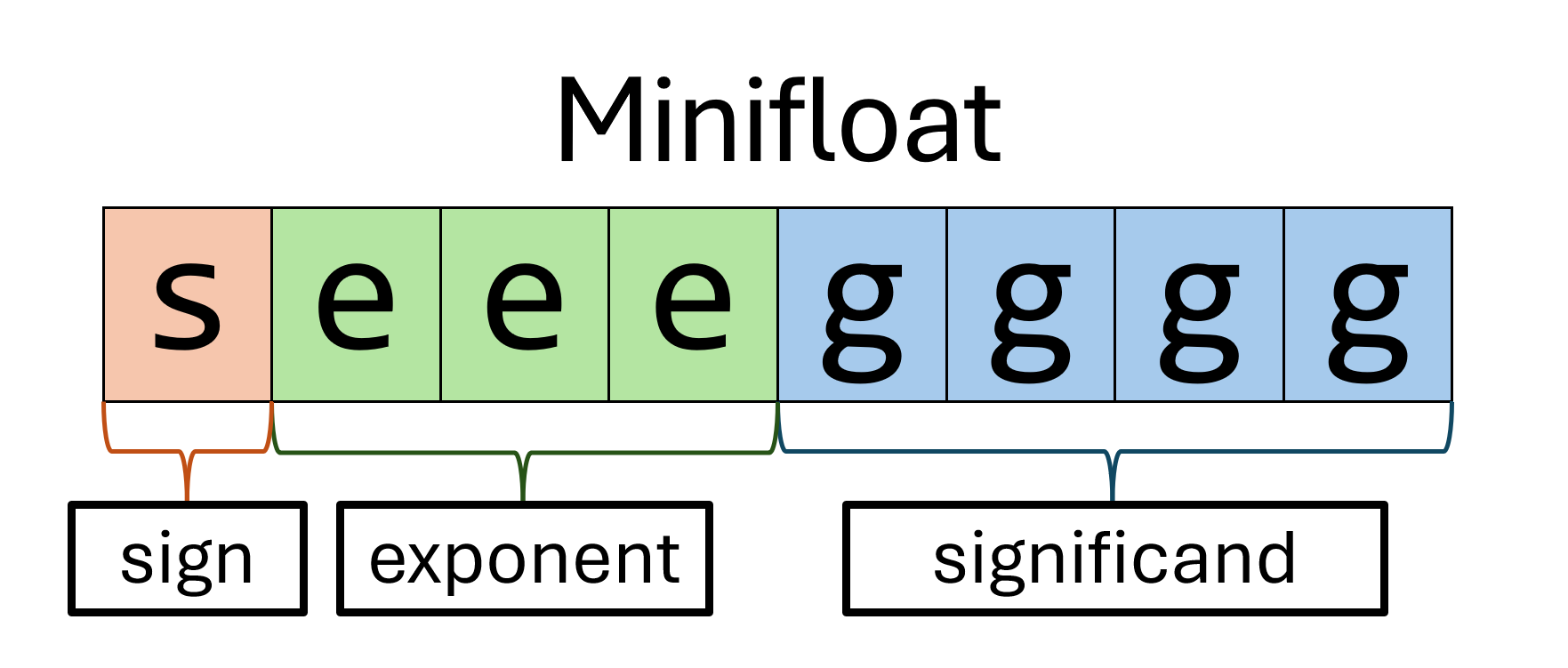
-
As in standard formats, a sign bit of
0indicates a positive number, and a sign bit of1indicates a negative number. -
Minifloats have a bias of 3. In other words, we subtract 3 from the bit-representation of a minifloat exponent. In comparison, single-precision floating-point numbers (i.e.,
float) have a bias of 127.
Some terminology: We refer to the bit-representation exponent as biased since its encoded as the bias plus the decimal-representation exponent. The decimal-representation exponent is unbiased. -
Like standard floating-point formats, minifloats append a leading 1 to the significand bits with the \(1.g\) notation. So if the four significand bits are \(g_3 g_2 g_1 g_0\), then the “base” part of the represented value is the binary number \(1 . g_3 g_2 g_1 g_0\).
-
Like standard floating-point formats, minifloats have special cases for zero: any minifloats with an exponent of \(000\) represent exactly the number \(+/-0.0\) depending on the sign bit.
-
Unlike standard floating-point formats, our minifloats do not use special values: not a number (NaN) and infinity (\(+∞\) and \(-∞\)).
-
Unlike standard floating-point formats, minifloats do not support subnormal values. Instead, all would-be subnormal values—with an exponent of zero—are instead different representations of the number zero.
All together, the value represented by a nonzero minifloat with sign \(s\), exponent \(e\), and significand \(g\) is:
\[ (-1)^s \times (1 + g \times 2^{-4}) \times 2^{e - 3} \]
Or, equivalently, if you prefer to think of the significand’s representation in terms of bits:
\[ (-1)^s \times (1.g_3g_2g_1g_0) \times 2^{e - 3} \]
where \(g_3\) is the significand’s most significant bit, \(g_0\) is the least significant bit, and so on.
This formula applies to all nonzero minifloats. Recall that any minifloat with an exponent of \(000\), no matter the significand, has a magnitude of zero.
Out-of-bounds behavior
-
Overflow: If the exact result of an operation is larger than the largest minifloat \(L\), or smaller than the smallest minifloat \(-L\), then you should return the largest minifloat or the smallest minifloat, respectively.
-
Underflow: If the exact result of an operation is between the smallest positive nonzero minifloat \(\ell\) and zero, or between zero and the largest negative nonzero minifloat \(-\ell\), then you should return zero.

In other words, if the exact result of an operation is outside the range \([-L, L]\), then it needs to be clamped back to that range. Additionally, if it is inside the range \((-\ell, \ell)\), then it needs to be approximated as zero. When flushing to zero, make sure to return the ‘canonical’ zero, that is, 0000 0000.
Tip
It is not necessary to consider the significand to perform the clamping! Once the operation is done and the result is renormalized, the exponent can tell the whole story.
Examples
Now that we have defined our minifloat specification, let’s see some examples!
Example 1: 10111100
We have a sign of 1, an exponent of 011, and a significand of 1100.
- Our sign bit
1corresponds to \(-1\). - Our exponent
011corresponds to a decimal exponent of \(3-3 = 0\). (We’re subtracting our \(3\) bias here.) - Our significand
1100corresponds to the binary number \(1.1100_2\), which is \(1.75\) in decimal. (The leading1is implicit.)
Altogether, 10111100 is \(-1 \times 1.75 \times 2^0 = -1 \times 1.75 \times 1 =
-1.75\) in base-10.
Example 2: 00010010
We have a sign of 0, an exponent of 001, and a significand of 0010.
- Our sign
0corresponds to \(+1\). - Our exponent
001corresponds to a decimal exponent of \(1-3 = -2\). - Our significand
0010corresponds to the binary value \(1.0010_2\), which equals \(1.125_{10}\) in decimal. (The leading1is implicit.)
Altogether, 00010010 is \(1 \times 1.125 \times 2^{-2} = \frac{9}{32} =
0.28125\) in base-10.
Example 3: 10001010
We have a sign of 1, an exponent of 000, and a significand of 1010.
- Our sign
1corresponds to \(-1\). - Our exponent
000means the magnitude is zero. - Our significand
1010is irrelevant, since the exponent is000.
Altogether, 10001010 is \(-0.0\) in base-10.
Converting between Minifloats and Decimals
Decimal to Minifloat
To convert a decimal number into a minifloat:
- Convert the integer and fractional parts into binary.
- Normalize to match the format \( 1.g_3g_2g_1g_0 \times 2^e \).
- Convert exponent into biased form (i.e., add 3).
- Set the sign bit accordingly.
Example: Converting 2.25 into an 8-bit float
Step 1: Convert the integer and fractional parts to binary.
Converting the integer portion into binary yields 10.
Our fractional part is 0.25. To convert, multiply the fractional part by 2, record the integer part of the result (should be 0 or 1), and repeat with the new fractional part until the fractional part becomes 0 or the precision limit is reached (which is 4 digits for our minifloat format). The recorded integer parts of this process becomes our binary representation for the original fractional part.
- \( 0.25 \times 2 = 0.50 \). Record
0. - \( 0.50 \times 2 = 1.00 \). Record
1.
Thus our binary representation of 0.25 is 01. Together with the integer
portion, our binary representation of 2.25 is 10.01.
Step 2: Normalize to match the format \( 1.g_3g_2g_1g_0 \times 2^e \).
Now we normalize our result so that it fits the format \(1.g_3g_2g_1g_0
\times 2^e\). In this case, we shift the binary point to the left by one
place: \(1.001 \times 2^1\). The leading 1 is implicit, so our four
stored significand bits are 0010.
Step 3: Convert exponent into biased form (i.e., add 3).
Next, we need to apply our format’s exponent bias, which for minifloats is 3. To
bias the exponent, we add our unbiased exponent \(e\) with the bias. So,
\(1 + 3 = 4\) (100 in binary).
Step 4: Set the sign bit accordingly.
Lastly, because 2.25 is positive, the sign bit should be set to 0.
Thus the minifloat representation of 2.25 is 01000010.
Minifloat to Decimal
To convert from a floating-point number into a decimal number:
- Extract the sign, exponent, and significand.
- Interpret the significand using its implicit leading
1. - Undo the exponent bias by subtracting 3.
- Convert the resulting binary value to decimal.
- Add a negative sign if necessary.
Example: Converting 11011100 into a Decimal
Step 1: Extract the sign, exponent, and significand.
- Sign bit:
1(negative) - Exponent:
101 - Significand:
1100
Step 2: Interpret the significand using its implicit leading 1.
Our significand bits 1100 correspond to the binary significand 1.1100.
Step 3: Undo the exponent bias by subtracting 3.
We first convert our binary exponent 101 into base-10, yielding 5. We then
subtract our bias (which is 3 for minifloats) from our exponent to get \(
5-3=2 \).
Thus, our minifloat represents:
\[ -1.1100_2 \times 2^2 \]
Step 4: Convert the resulting binary value to decimal.
We shift our binary point 2 places to the right, yielding 111.00.
Next, we convert the integer and fractional parts of 111.00 into base-10. Since \(111_2 = 7_{10}\) and \(0_2 = 0_{10}\), we have \(111.00_2 = 7.0_{10}\).
Step 5: Set the sign according to sign bit.
Since the sign bit is 1, the final value is: \(-7.0\).
Adding Minifloats
To perform addition with floating-point numbers:
- Rewrite the number with the larger exponent so that the exponents are equal, shifting its significand to the left accordingly.
- Add the significands together.
- Recombine and round the result if necessary. If the resulting significand has more bits than the format allows, round it back down to the required precision. Always resolve ties away from zero. Remember to clamp if necessary!
Example: \(1.5 + 0.5\)
First, we need to convert 1.5 and 0.5 into their minifloat representations. For 1.5 this is \(1.1 \times 2^0\), and for 0.5 this is \(1.0 \times 2^{-1}\).
Step 1: Adjust the significand
Because the exponents differ, we shift 1.5’s significand to the left by one and use an exponent of \(-1\): \( 1.1 \rightarrow 11.0 \)
Now both numbers have an exponent of \(-1\).
Step 2: Add the significands together.
- \( 11.0_2 + 1.0_2 = 100.0_2\)
Step 3: Recombine and round the result if necessary
- \( 100.0_2 \times 2^{-1} = 1.0 \times 2^1 \)
Thus the answer is 0 100 0000 which is equivalent to 2.0 in base-10.
Multiplying Minifloats
To perform multiplication with floating-point numbers:
- Find the sign of the product, which is found by looking at the sign bits of both minifloats.
- Add the bit-representation exponents of both minifloats, then subtract 3 to encode.
- Multiply the significands together, while restoring the implicit leading 1.
- Recombine and round the result if necessary. If the resulting significand has more bits than the format allows, round it back down to the required precision. Always resolve ties away from zero.
Example: \(4.0 \times 0.625\)
First, we convert 4.0 and 0.625 to their minifloat representations. For 4.0 this is \(1.0 \times 2^2\) and for 0.625 this is \(1.01 \times 2^{-1}\).
Step 1: Determine the sign.
Because both 4.0 and 0.625 have 0 as their sign bit, our product will also have 0 as its sign bit.
Step 2: Add the bit-representation exponents together, and subtract the bias of 3 once. This results in the final encoded exponent.
For 4.0 this is 5 and for 0.625 this is 2. Thus, we compute the final exponent bias 101 + 010 - 011 = 100, or 4 in base 10.
Step 3: Multiply the significands after prepending the leading 1.
For 4.0 this is 10000 and for 0.625 this is 10100. The product of these two significands is 101000000.
Step 4: Renormalize and recombine, if necesarry.
Since 101000000 is within the range of \([2^8, 2^9)\), we don’t need to adjust the exponent and can continue using our value of 4 from Step 2.
However, we need to reduce 101000000 back to a 5-digit significand. We can do this by shifting it right by 4. This results in a significand of 10100 (significand of 0100 with the implicit leading 1). The remainder from shifting was 0000, so no rounding is necesarry.
Our final float is 0 100 0100, or \(1.01 \times 2^1\), which is 2.5 in base-10.
Bit size in C
We want to ensure that the type we are using to represent a minifloat is exactly 8 bits.
We will use the uint8_t type from C’s stdint.h header.
(We will avoid char, even though char is 8 bits on most platforms, because C unhelpfully does not guarantee that is is exactly 8 bits everywhere.)
To break down this type, the uint means that bit-level operations are as on an unsigned integer, the 8 means that we expect operations to be on 8 bits, and _t is a common naming convention that indicates that this is a type.
The stdint.h header defines many similar types, like these:
| Type | Description |
|---|---|
uint8_t | unsigned integer with 8 bits |
uint16_t | unsigned integer with 16 bits |
int8_t | signed integer with 8 bits |
Your Task
This assignment is divided into two parts: displaying minifloats as decimals, and implementing operations on minifloats. Each part will have you implementing 1–3 functions, and adding test cases to help convince yourself these functions are correct. You must add at least 4 new test cases for mini_eq and 4 new test cases for each of the other functions in addition to what we have provided, though you may add more.
Warning
For all of your C implementations, you may not include any constants or variables of type
float,double, orlong double. You may not use C’s built-in floating-point operations, such as+, on floating-point values. In addition, in your implementation of minifloat operations (mini_eq,mini_add, andmini_mul), any integers you use must be at most 16 bits wide. For example, 32-bit and 64-bit integers are not permitted, but you can use 8-bit and 16-bit integers, either signed or unsigned. However, note that you can use integers of any size in yourmini_printimplementation.This is not an arbitrary restriction. Using a larger float representation in your implementation will defeat the purpose of the smaller representation, which is that they are smaller and faster than “normal” floating-point types. Because of floating-point error, it is also very likely to introduce incorrect results.
We have provided a mini_to_double utility function to help you with debugging and testing. You may not use this function in any of your submitted implementations, but you may use this function for writing test cases for any of your functions.
Part 1: Displaying Minifloats
Review
If you need to, look over the lecture notes on standard floating-point types to remind yourself of the basic principles. And try out float.exposed to get hands-on practice!
Read over the background above and especially the specification for minifloats. To briefly summarize the minifloat format:
- Bit 7 is the sign bit
- Bits 6–4 are the exponent bits
- Bits 3–0 are the fraction bits
(Bits are numbered from the right, so 0 is the least significant bit.)
Displaying Minifloats
Your task is to implement a function for displaying minifloats in C, named print_mini. This function takes in a minifloat and must print the sign, whole number, and fractional part associated with this minifloat as a base-10 value. The exact specification, with examples, is given in minifloat.h. Your implementation should be filled into minifloat.c.
To make your task somewhat easier, we have written a concrete call to printf at the end of the each function that you may use as a guide for what to implement. Note that print_mini requires that we write 6 decimal digits—the provided printf specifier %06d will fill any integer to have preceding zeros such that the printed integer has 6 digits. To provide two concrete examples:
printf("%06d", 123)will print000123printf("%06d", 100000)will print100000
Warning
Remember, you may not include any constants or variables of type
float,double, orlong double, and you may not use any floating-point operations. You may, however, use any integer arithmetic operation (including integer division and modulus). In C, dividing two integers withi / jproduces an integer. But be sure not to include a double constant (such as1.0) by accident.
Tip
You may find it useful to observe that, for example, \(1/64=0.015625\), and that, with integer division, \(1000000 / 64 = 15625\).
Testing Part 1
A test script to help guide your development can be found in minifloat_test_part1.c. You can build this test with the following command:
rv make part1
To test this code, you must execute the resulting .out file and pipe your print results to a file, such as with the following command:
rv qemu minifloat_test_part1.out > minifloat_test_part1.txt
Note
Reminder: use the
rvaliases for each command if you have it set up!
Finally, you must compare the resulting prints to our expected results using diff:
diff minifloat_test_part1.txt minifloat_test_part1.expected
If you observe any differences between the two, a printing test failed.
You can also combine these operations into a single bash command:
rv make part1 && rv qemu minifloat_test_part1.out > minifloat_test_part1.txt && diff minifloat_test_part1.txt minifloat_test_part1.expected
Reminder: You must add 4 new printing tests (which means modifying both minifloat_test_part1.c and minifloat_test_part1.expected).
Part 2: Minifloat Operations
Your second task is to implement an equality check, addition, and multiplication between minifloats. Specifically, you will be implementing mini_eq, and a minifloat operation of your choice: mini_add or mini_mul, both of which take in two minifloats and produce a new minifloat. As before, the specifications for each function can be found in minifloat.h, and your implementation should be written in minifloat.c.
Rounding.
The arithmetic operations mini_add and mini_mul must produce the minifloat value closest to the exact result of the operation performed on real numbers. If there are two possible closest minifloats, your implementation must return the one that is further from zero. For example, suppose we want to add the minifloats 00110001 (\(1.0625\)) and 00110010 (\(1.125\)). In real arithmetic, we get an answer of \(2.1875\), which has no minifloat representation. The two closest minifloats are 01000001 (\(2.125\)) and 01000010 (\(2.25\)). Since each of these differ from the real answer by the same amount but the latter is further from \(0\), we round to \(2.25\). Similarly, we would round a real answer of \(-1.09375\) to \(-1.125\).
Underflow and overflow. When an operation’s result is out of range, different rules apply. If the result of the operation is \(0\), or if the result underflows, you must return exactly \(0000 0000\). If the result of the operation overflows, you must return the maximum representable magnitude with the appropriate sign.
Equality. Consider minifloats to be equal if and only if they represent the same real-number value. Remember that there are multiple minifloat values that represent zero.
Tip
If you become stuck on any of these functions, consider attempting another—each requires detail that can become more obvious while working on another. Your grade in this part will be determined by the operation (
mini_addormini_mul) that performs more correctly.
Testing Part 2
Testing minifloat operations is more straightforward than testing the printing implemented earlier. We can simply run each test file and compare the resulting minifloats to expected values. To test part 2, you can directly build and execute part2:
rv make part2 && rv qemu minifloat_test_part2.out
Note
Remember, you must add four new tests for each function. Specifically, 4 for
mini_eqand 4 for eithermini_addormini_mul, the operation you chose to implement.
Tip
Write as many edge-case tests as you can think of, there are many potential tricks with negative numbers and very small or very large minifloats.
Warning
The
mini_to_doubleutility is only for testing. Do not use it in your main implementation.Remember that your goal is to implement minifloat operations from scratch, using only integer arithmetic. This is what makes minifloats more efficient than
floatordouble.
Submission
Submit minifloat.c, minifloat_test_part1.expected, minifloat_test_part1.c, and minifloat_test_part2.c to Gradescope.
Upon submission, we will provide a smoke test to ensure your code compiles and passes the public test cases.
Run smoke test locally
You can build smoke test locally with the following command:
rv make smoke_test
If you have implemented mini_add or mini_mul, you can enable the corresponding smoke tests by passing TEST_ADD=1 or TEST_MUL=1:
rv make smoke_test TEST_ADD=1
rv make smoke_test TEST_MUL=1
rv make smoke_test TEST_ADD=1 TEST_MUL=1
To test this code, you must execute the resulting .out file and pipe your print results to a file, such as with the following command:
rv qemu minifloat_smoke_test.out > minifloat_smoke_test.txt
Finally, you must compare the resulting prints to our expected results using diff:
diff --strip-trailing-cr minifloat_smoke_test.txt minifloat_smoke_test.expected
If you observe any differences between the two, a printing test failed.
You can also combine these operations into a single bash command:
rv make smoke_test && rv qemu minifloat_smoke_test.out > minifloat_smoke_test.txt && diff --strip-trailing-cr minifloat_smoke_test.txt minifloat_smoke_test.expected
Rubric
- 20 points:
print_minicorrectness - 22 points:
mini_eqcorrectness - 40 points:
mini_addormini_mulcorrectness - 18 points: test quality