**CS 1109: Fundamental Programming Concepts (Summer 2024)**
[Home](../index.md.html) • [Syllabus](../syllabus.md.html) • [Schedule](../schedule.md.html) • [Assignments](../assignments.md.html) • [Labs](../labs.md.html)
(#) Lab 1: Getting Started with Python
In this lab, we will set-up Python on your personal computers. Afterwards, you will write your first Python program and experiment with evaluating expressions in the Python interpreter.
!!! note: Due Date
This lab is due **Friday, June 28th, 2024 at 11:30 am EDT**.
(#) Installing Python
As you very well know by this point, we will be using [Python](https://python.org)[^python] as the programming language for this course. We will be using Python's native IDLE program for writing and running Python programs. The goal is to get you writing code with very little setup required.
All you need to do is click the "Download" button on the [Python website here](https://www.python.org/downloads/) for the latest version of Python (as of today, version 3.12.4). Once downloaded, run the installer and go through the standard installation process for your operating system. If you get stuck, let me know.
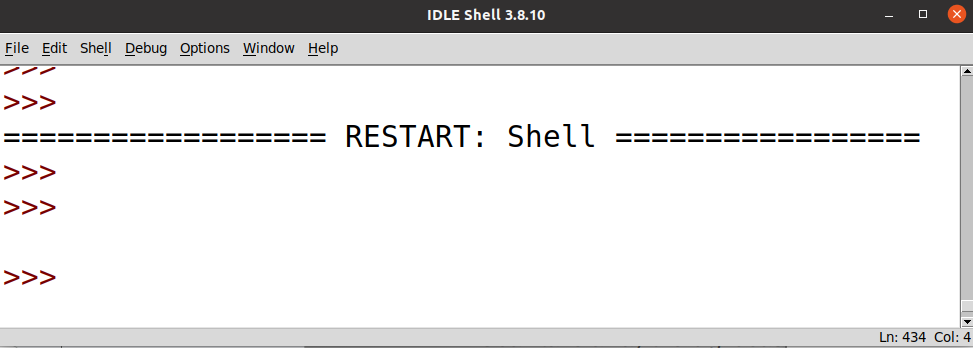
Once finished, open the program "IDLE". You should see something like this:
(#) Practice 1: "Hello, World!"
In this exercise, you will write your first Python program. It is tradition to write the `"Hello, World!"` program which simply displays the greeting "Hello, World!".
1. In the IDLE shell, create a new file by clicking "File" and "New File".
2. Save your new file with the name `lab1_.py`. (Do not type the angle brackets).
3. Type the following text into your freshly made `lab1_.py` file.
~~~~~~~~~~~~~~~~~~~~~~~~~ Python listing
print("Hello, World!")
~~~~~~~~~~~~~~~~~~~~~~~~~
4. Run your code by clicking "Run" and then "Run Module". It will ask you to save before running. Save your file. You should now see the IDLE shell output `Hello, World!`. If so, congrats on running your first Python program successfully! If not, please ask for help after trying to get it to run yourself.
(#) Practice 2: The Python REPL
In Practice 1, you wrote a Python program and then executed the program by passing the file to the Python interpreter within the IDLE Shell. You can also execute Python code directly in the IDLE Shell. This shell is also called the Python REPL.
REPL stands for **Read, Evaluate, Print, Loop** and it allows the user to enter a line of Python code into the REPL and the interpreter will *read* the line, *evaluate* the code, *print* the result of evaluating the code, and *loop* back to the beginning of the process (i.e., back to read!).
1. Type the following line into the IDLE shell, press enter, and see what happens.
~~~ Python listing
>>> print("Hi, REPL!")
~~~
!!! Note:
Do not actually type the `>>>` into the REPL. I have included them in the above code to signify that I am typing this into the shell.
This is the fastest way to test out new Python syntax. Be careful though, restarting the shell will delete all previously declared variables. Use for experimenting only. Use Python files for actually saving code and developing programs.
(#) Practice 3: Arithmetic Operations
One of the most basic building-blocks of most programs are arithmetic expressions. Python provides a number of *operators* that represent common computations such as addition or multiplication.
1. Try evaluating the following arithmetic expressions in the Python shell. Before executing each expression, try to predict what Python will print out.
Please feel free to experiment and try expressions and symbols that don't appear in the list below! Try and make some mistakes to see what happens.
* `2 + 3`
* `3 * 9`
* `5 + -1`
* `"2" + "3"`
* `4 ** 2`
* `3 / 2`
* `3 % 2`
* `2 + 3.0`
2. Try executing a few of these more complicated expressions. As before, try and compute the result on paper before having Python evaluate the expression for you! Verify that Python respects PEMDAS order.
* `3 + 2 * 5`
* `-1 * (2 + 6)`
* `- (2 + 6)`
* `2 ** 3 * 4 // 6`
* `3 - 4 % 2`
(#) Practice 4: Mistakes will be made
The REPL is a great way to experiment in Python (or any language that has one!). Making mistakes is not only part of life, but is a **reality** in programming. If you're unsure how something works, just try it out! Nothing bad can happen in the REPL (hopefully!) and it is better to make mistakes on purpose now instead of when you're working on real-world software!
For this exercise, try and predict what Python will do to handle each possible mistake. If you get an error message, try and decipher what it is trying to tell you.
1. In a `print` statement, what happens if you leave out one of the parentheses, or both?
2. If you are trying to print a string, what happens if you leave out the quotation marks? What if you replace the quotation marks with single quotes (i.e., `'hello'` instead of `"hello"`)?
3. Some of the arithmetic expressions in Practice 3 contained negative numbers (e.g., `-1`). We place a single hyphen in front of a numerical value to make it negative. What happens if you instead put a `+` in front of a number? What would `2++3` evaluate to? How many pluses will Python allow in front of a number? What if you put multiple hyphens in front of a number (e.g., `--3`)
4. In math, you can prepend leading zeroes to a number and doing so does not change its underlying vlaue. For example, 09 is really the same number as 9. Is this the case in Python?
(#) Practice 5: Types, types, and more types!
A **type** is a set of values along with operations over these values. This is so important I'm going to put this definition in its own special box:
!!! tip: **Type**
A set of values along with operations over these values.
For example, `int` is a type in Python. Some values of type `int` are `3`, `51`, and `-7`. Some operations for `int`s are `+`, `-`, and `*`.
1. The `type` function will return the type of a value or variable.
~~~ Python listing
>>> type(3)
<class 'int'>
~~~
The word "class"[^class] is used in the sense of a *category*; a type is a *category* of values with associated operations.
Try using the `type` function on other values. What happens if you try and call `type` on the `print` function (i.e., `type(print)`?
2. Is there a maximum value for `int`s? Try evaluating the following expressions in the REPL.
* `2 ** 100`
* `2 ** 1000`
* `2 ** 10000`
3. The `float` type represents real numbers (e.g., 1.5, -9.2103, and $\pi$). A `float` is specified by the inclusion of a decimal point, such as `3.2`.
For each of the following expressions, predict what the output is before evaluating in the REPL.
* `type(2)`
* `type(2.0)`
* `3 * 2.5`
* What is the type of this expression?
* Why is it that type?
* `13.92e6`
4. Is there a maximum value for `float`s? Try evaluating the following expressions in the REPL and compare the results to the results you got for `int`s.
* `2.0 ** 100`
* `2.0 ** 1000`
* `2.0 ** 10000`
5. Predict what the following expression evaluates to.
~~~ Python listing
>>> 0.1 + 0.2
?
~~~
Why might this be happening?
6. The last type we will cover here is `str`, or the string type. A `str` represents text, such as `"hello"`, `"Zach"`, and `"CS 1109"`.
One operation over `str`s is the `+` operator which performs *string concatenation*. For example:
~~~ Python listing
>>> "CS" + "1109"
"CS1109"
~~~
You might be asking yourself, "But wait, I thought `+` was for addition?" Well, you are correct! In programming languages, this phenomenon is generally called *operator overloading*. In Python, the meaning or the *semantics* of the `+` operator changes depending on the types of the values you give to the `+` operator.
For example, `+` means addition in the expression `2 + 3` as `2` and `3` are both of type `int` whereas `+` refers to concatenation in the expression `"abc" + "def"` as `"abc"` and `"def"` are both of type `str`.
For each expression, try and predict what the result is before evaluating in the REPL.
*
"Cornell"
*
'Cornell'
*
'Cornell"
*
"What" + " " + "about" + " this?"
*
"2 + 2 equals " + 4
*
'What if there's an apostrophe in my string?'
*
"What if there's an apostrophe in my string?"
*
"strings with" * "multiplication?"
*
"Around The World" * 3
7. It is also possible to convert a value into another type. Each of Python's built-in types (e.g., `int`, `float`, `str`, etc.) comes with a conversion function which is simply the type's name:
* `int(X)` converts `X` into an `int`,
* `float(X)` converts `X` into a `float`,
* `str(X)` converts `X` into a `str`.
For each expression, try and predict what the result is before evaluating in the REPL.
* `int(5)`
* `int(5.21)`
* `float(3)`
* `str(87)`
* `int("1109")`
* `int("3.14159")`
* `"2 + 2 equals " + str(4)"`
* `str(int(float(int("32"))))`
(#) Lab 1 Questions
1. Here is an operator you can use in Python: `//`. Without looking it up, write down two examples/lines of working code using this operator. Then as a comment, write a sentence describing what you think this operator does.
2. Is there a difference between `9`, `+9`, and `++9`? Is there a difference between `-9`, `--9`, and `---9`? Can you explain what Python is doing with pluses and minuses in front of an integer?
3. Did you find a maximum for `int`s? What about `float`s? Guess why they might or might not have a max.
4. Why do you think `0.1 + 0.2` do not equal 0.3 in Python?
5. Implement the Pythagorean Theorem with any values of a and b that you choose. Print out text that says "For a triangle with two sides of length *a* and *b*, the hypotenuse length is *c*.", replacing the variables with the numbers you calculated.
6. Create 3 integer variables of your choosing. Calculate and print the average of these numbers.
7. Implement the Quadratic formula in Python with any values of a, b, and c you want. Do not use any `import` statements. Remember that square roots can be expressed as exponents. Print out the inputs you chose and the outputs the formula gave you.
(#) Instructions For Submitting
Please add this header to your lab 1 Python file.
~~~~~~~~~~~~~~~~~~~~~~~~~ Python listing
# Lab 1
# YOUR NAME (netid)
#
~~~~~~~~~~~~~~~~~~~~~~~~~
After your `"Hello world"` line of code, please answer the questions from the Lab 1 Questions section above using the following format:
~~~~~~~~~~~~~~~~~~~~~~~~~ Python listing
### Question
Your code/answer here
### Question
Your code/answer here
~~~~~~~~~~~~~~~~~~~~~~~~~
Upload your `lab1_.py` to [Canvas](https://canvas.cornell.edu/courses/64874/assignments/) under the assignment for this lab.
-------------------------------------------------------------------------------
[^python]: Python (the programming language) is in fact *not* named after the Pythonidae family of snakes, [but in fact after the British comedy troupe, "Monty Python"](https://docs.python.org/3/faq/general.html#why-is-it-called-python).
[^word]: Actually, `.doc` "files" are actually closer to folders than individual files!
[^class]: "class" is a term used in object-oriented programming. Python does have object-oriented features, but we will likely not get to object-oriented programming by the end of this class.
-------------------------------------------------------------------------------
Portions of this lab were drawn from [Titus Klinge's CS 111 at Carleton College](https://cs.carleton.edu/faculty/tklinge/teaching/2019s/cs111/).

Unless specified elsewhere on this page, this work is licensed under a [Creative Commons Attribution-ShareAlike 4.0 International License](http://creativecommons.org/licenses/by-sa/4.0/).
-------------------------------------------------------------------------------
 (#) Practice 1: "Hello, World!"
In this exercise, you will write your first Python program. It is tradition to write the `"Hello, World!"` program which simply displays the greeting "Hello, World!".
1. In the IDLE shell, create a new file by clicking "File" and "New File".
2. Save your new file with the name `lab1_
(#) Practice 1: "Hello, World!"
In this exercise, you will write your first Python program. It is tradition to write the `"Hello, World!"` program which simply displays the greeting "Hello, World!".
1. In the IDLE shell, create a new file by clicking "File" and "New File".
2. Save your new file with the name `lab1_