Assignment A4 CS100J Fall
2005 Due Sunday, 23 October, 23:59
This assignment introduces you to graphics. You will write procedures that
draw stars, spirals, and bouncing balls in a JFrame. You may work with one other
person. If you do so, please form a group for this assignment on the CMS WELL
BEFORE YOU SUBMIT YOUR FILES. At the end of this document, we tell you what
to submit. You will not use a JUnit testing program because you will be looking
at visual output (graphics) to determine correctnesss. We would like to know roughly how much time you spent on the project, so keep track, please.
Download class Turtle (from here or
from the course website), put it in its own directory, and open it in DrJava.
A Turtle is a pen of a certain color at a pixel (x, y)
that is pointing in some direction, given by angle turtleAngle (0 degrees is to the
right; 90 degrees, up; 180 degrees, left; 270 degrees, down; etc.). When the turtle
is moved to another spot using procedure move, a line is drawn if the pen is
currently "down" --if it is "up", nothing is drawn. The
pen is initially black, but its color, of class java.awt.Color,
can be changed. A footnote on page 1.5 of the ProgramLive CD contains information
about class Color.
Study the specification of the methods of class Turtle to become familiar with the methods that manipulate the Turtle. Note that the fields jframe, jpanel,
width, and height are static. There is only one JFrame, and many different Turtles can be active on it. Do this in the interactions pane:
d= new Turtle(); Then, execute this method call and see what happens in the window: d.move(150); . Notice that two methods can be used to change the
color of a turtle: One uses an integer to indicate the color; the other uses a value of class Color.
In DrJava, create another file with the following class in it (use the indent-line
feature of DrJava to indent the lines appropriately) and save it in the same
directory with file Turtle.java. When compiling it, if you get some message about an illegal character at the end, delete the last line, type in another '}', and trying compiling again.
import java.awt.*;

  /** Assignment A4: using a Turtle */

  public class YourTurtle extends Turtle {

  /** Draw a black line 30 pixels to the right and then

  a green line 35 pixels down. */

  public void drawTwo() {

  move(30); // draw a line 30 pixels to the right

  addAngle(270); // add 270 degrees to the angle

  setColor(Color.green);

  move(35);

  }

  }
We give you one method in this class as an example of how graphics works. After
compiling class YourTurtle, create using DrJava's interaction pane an instance of
class YourTurtle and then execute a call on this method and see what happens.
A JFrame should be created and two lines should be drawn on it.
In the interactions pane (or in a method in class YourTurtle), draw
some things to familiarize yourself with class Turtle. After that,
perform the following tasks. Before you write a method body, put a precise and complete specification on it as a javadoc comment .
The specification should allow anyone to know precisely what a call on the method
does. It must mention all parameters and say what they are for. Look at the
javadoc spec to make sure the javadoc comments are appropriate. As usual, your
methods must have our names, exactly, and have the same parameters.
 Task
1. Write a procedure
Task
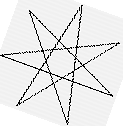
1. Write a procedure drawStar(int d) that draws a seven-pointed star whose lines
have length d with the current turtle. An example appears to the right in this
paragraph. It consists of 7 lines; draw those lines using a loop. Each iteration of the loop should simply draw a line of length d and change the angle. Don't worry about what angle the turtle is facing when you start
drawing the star. The angle between
the two lines that make a point is 25.714285714285722 degrees. However, because of the way the
drawing is done, to get that angle in a point, after drawing a line, you have to add 154.28571428571428 degrees to the angle. Note that the two angles mentioned in this paragraph add up to 180.
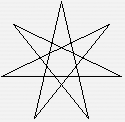
Task 2. The orientation of the star drawn
by drawStar depends on the angle at which the turtle is facing when the drawing
starts. Write a procedure drawStarUp(int d) that draws a star at the current
position of the turtle with the point straight up (so that one line is horizontal),
as in the first star on the right above.
 Task
3: Draw a spiral. The picture to the right is done by drawing
10 lines, as follows. The first one has length 5; the second, 10; the third,
15, etc. After each line, 90 degrees is added to the angle. The lines alternate
among three colors: green, blue, red.
Task
3: Draw a spiral. The picture to the right is done by drawing
10 lines, as follows. The first one has length 5; the second, 10; the third,
15, etc. After each line, 90 degrees is added to the angle. The lines alternate
among three colors: green, blue, red.
Write a procedure spiral(int n, double a, int d, int sec)
that (1) clears the drawing frame, (2) moves the turtle (without drawing) to the middle and sets the turtle to face to the east (right), and (3) draws n lines, adding angle a
after each one. Line 1 is d pixels long, line 2 is
2*d pixels long, ..., line i is d*i
pixels long. The lines alternate among green, blue, and red. Pause sec
microseconds after drawing each line.
When you first test your method, use 5 for d and 0 for sec. Try different angles
--90 degrees, 92 degrees, 87 degrees, etc. You can also use sec = 500 or sec
=1000 in order to see the lines drawn one at a time.
You will be amazed at what method spiral does. Find out by trying these calls --assuming that x is a YourTurtle
folder:
x.spiral(500, 90, 1, 0);
x.spiral(500, 135, 1, 0);
x.spiral(500, 60, 1, 0);
x.spiral(500, 121, 1, 0);
x.spiral(500, 89, 1, 0);
x.spiral(500, 135, 1, 0);
x.spiral(500, 120, 1, 0);
x.spiral(500, 45, 1, 0);
x.spiral(500, 137, 1, 0);
Task 4: Bouncing balls. Procedure fillCircle in Turtle lets you draw
a disk –a filled-in circle. You can use this method to draw a bouncing
ball. Suppose the ball is at some position (x, y). To make it look like the ball
is moving, repeat the following process over and over again:
1. Pause for 100 microseconds.
2. Move the ball: (1) Draw the ball at its current position using color white,
thus erasing it, (2) change the position of the turtle, and (3) draw the ball
in its own color.
(a) Start a new .java file for class Ball. Class Ball should extend YourTurtle. Note: Do note extend Turtle;
extend YourTurtle. This class
needs three (private) fields: radius gives the radius of the ball and vx and vy contain the speed --moving the ball consists of moving it vx pixels
in the horizontal direction and vy pixels in the vertical direction. Write getter
methods for the three fields.
(b) Write a constructor Ball(x, y, vx, vy, r, c) that initializes
a new Ball folder so that the turtle starts at (x, y),
has speed (vx, vy), has radius r, and is drawn
with Color c. You know the constructor works properly when you
see the ball in the panel. Test your constructor by creating several balls with different starting points,
radii, and colors before going on to the next step. To make things easier,
you might also want to write a constructor Ball(vx, vy, r) that
starts the turtle at the midpoint of the panel, has speed (vx,
vy), has radius r, and is a black ball.
(c) Write a procedure moveBallOnce() that moves the ball once, as given
by its speed (vx, vy). Read these points carefully:
- To erase the ball, draw it with a white pen. To do this, you have to remember
the original color. Have a local variable
save to contain the original color and, after drawing the ball white, set the turtle color back to the value of save. After erasing the ball, move the turtle and then draw the ball in its original color.
- The ball should bounce off the sides of the wall, as follows. After moving the ball, if the
y-coordinate of the turtle is
less than the radius of the ball, then negate the
y-coordinate speed (using vy= – vy;). This means that the next move will be downward instead of upward. Do the same kind of thing for the other three walls.
Test method moveBallOnce() carefully. Here is an example of how to test it.
In the interactions pane, create a ball d of radius 40 that starts in the middle
of the panel and has speed (0, –30). Then, repeatedly execute d.moveBallOnce(); in the interactions pane
and watch what happens. Makes sure that it bounces properly off the top and
bottom walls. Then do the same kind of test for the left and right walls.
(d) Write a method inMotion() that puts the ball perpetually in motion. Its
body should be a loop that does not terminate and that has a repetend that (1)
pauses for 100 microseconds and then (2) moves the ball once. In the interactions
pane, create a new Ball d, call d.inMotion();, and watch the ball move. Stop execution by hitting the DrJava reset button.
Task 5. Something of your own. Write a
procedure that does something that you find interesting. Make sure you say what
it does in its specification. Place it in class Ball. We don't care what your procedure does.
You could draw a face whose size depends on a parameter. You could make some
interesting design with a few stars. You could write a method with a parameter n that draws an n-pointed star. You could have two bouncing balls change
direction when they collide --when they occupy the same space. (To have more than one ball move perpetually, you need a method with an infinite
loop that moves all the balls one step and then pauses.) You could have
more bouncing balls; when two collide, the smaller one blows up (goes completely
off the screen). You could change the initial color of the panel to something
other than white and then put a ball in motion, so that you see the path it
takes. How about placing some rectangles at the top of the panel; when a ball
hits them, the rectangle disappears and the ball changes direction. Usse your imagination. We will make
the most interesting procedures available on the course website.
What to submit. Create the javadoc spec for your program and look at it, making sure that all your methods are properly specified in it. Make sure classes Ball and YourTurtle are properly indented. At the top of class Ball,
put a comment that says what your interesting procedure is AND ALSO TELL US HOW MUCH TIME YOU SPENT ON THE ASSIGNMENT (for groups, give the average of the two people's time). Submit files YourTurtle.java and Ball.java.