Overview and Use
The trontest.exe application is a demonstration of the protocol stack running the Network Layer, Debug Layer, and
Pbcast Layer. It allows as many nodes as desired to be started and added into a pbcast view group. These nodes
pbcast their entire status at least once every second, but can also be set to pbcast null messages at a much
higher rate (although 1 message per second will be a full update). The trontest application can be used to monitor
for errors in the pbcast delivery sequence, monitoring the number of retransmissions per node, etc. On startup, it
requests a list of subnets to include in the test (which pbcast needs in order to create an initial view)
using the following dialog box:
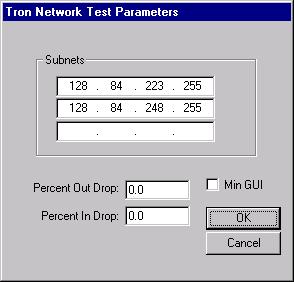
It also allows the user to artificially agument the percentage of incoming and outgoing messages that are to be
dropped by the Debug Layer. These are dropped in addition to whatever the normal network loss may be.
If the minimal gui is chosen, then the trontest application appears as follows:
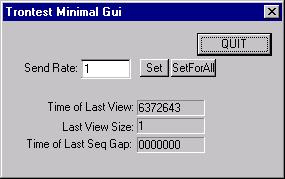
The rate at which can be set by entering a new value in "Send Rate" text field and hitting the "Set" button. If
the "SetForAll" button is used, all of the nodes will begin sending at that rate. The minimal gui displays only
information about the current node. If the "Time of Last Seq Gap" is all zeros, then no sequence gaps have occurred.
If the minimial gui is not chosen, then the trontest application provides a command console that can be used to
control all of the nodes:
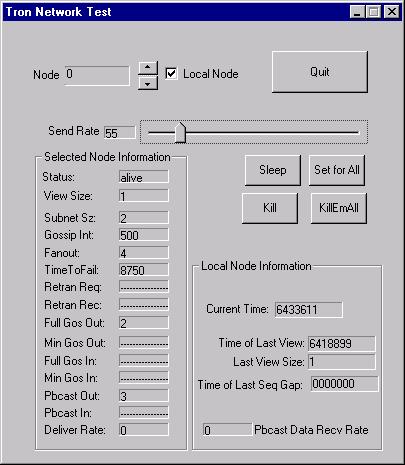
The complete gui shows information about both the currently selected node and the local node. It also shows the
currently selected node's send rate, and allows this to be adjusted. The selected node's information is a detailed
display of parameters from the pbcast layer. The "Pbcast Out" and "Pbcast In" refer simply to pbcast data messages
that are sent or received, while the "Deliver Rate" is the current rate at which pbcasts are being delivered to the
application layer. The local node information includes the current rate at which pbcast data messages are being
received, along with the time and size of the last view as well as the time of the last sequence gap that was detected
in pbcast delivery. If this field is all zeros, then no sequence gaps have occurred.
The trontest.exe application is useful for real-world, multisubnet testing of the protocol stack set up to use the pbcast layer. The source code can be found in the trontest directory.
How It Works
The trontest application creates a protocol stack with the Network, Debug, and Pbcast layers. At least once every second, each node pbcasts its status. If the full gui is chosen, this information is used to keep the display information up to date. A node tracks its status using cPbcastLayer::ReportStats(). When a node is selected and its send rate is set, a pbcast is sent with the new desired send rate. The pbcast is sent with either an ALL or SINGLE flag set, which determines whether all the nodes take the action (in the case of "SetForAll"), or just the destination node takes the action. Since all nodes receive each pbcast, they are constantly kept up to date concerning each node's status. In this manner, a single node can control the send rate of any node in the current view. If the send rate is greater than 1 message per second, then the trontest application will send enough null messages to match the desired send rate. All of the commands issued to a node in the trontest app act in a similar fashion.
Tron Simulator ApplicationOverview and Use
The tronsim.exe application is a demonstration of the protocol stack running the Network Simulation Layer, Debug Layer, and
Pbcast Layer. It allows the user to specify the number of subnets and nodes per subnet to be simulated in the simulator on startup:
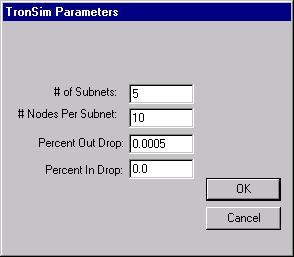
It also allows the user to set the percentage of incoming and outgoing messages that are to be
dropped by the Debug Layer. The network simulation layer does not drop any packets.
The tronsim.exe application provides a command console for the entire simulation. It allows access to the
information for each of the nodes by selecting a (subnet, node) pair. The application should appear as follows:
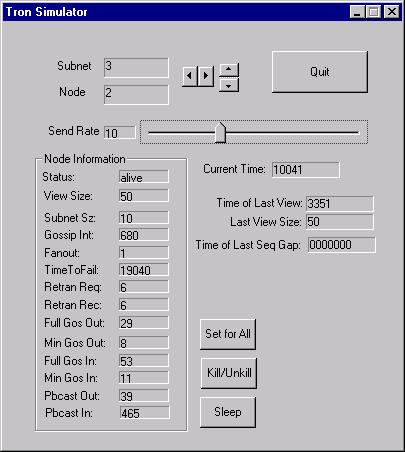
The per node information is taken mainly from the pbcast layer. The "Time of Last View", "Last View Size", and
"Time of Last Seq Gap" represent information for all of the nodes combined. The simulator runs on simulated time,
which means that all of the simulated nodes get an equal timeslice before time is advanced. That is why the
"Current Time" indicator may not advance in actual milliseconds, although it is constrained to advance no faster than
one millisecond per tick. The tronsim applicaiton allows send rate for each of the nodes to be set individaully,
or with the "Set For All" button it allows the send rate to be set for all nodes at once. The "Kill/Unkill" button
toggles a node's state (whether or not it receives a timeslice). The "Sleep" button causes the node to stop receiving
timeslices for a certain amount of time.
The tronsim application is an example of how the simulation layer can be used to debug and verify aspects of protocols and/or new layers that are added to the protocol stack. The source code can be found in the tronsim directory.
How It Works
The tronsim application creates an entire seperate protocol stack with Network Simulation, Debug, and Pbcast Layers for each node to be simulated. It creates a single simulation engine object (cSimEngine) and passes that to the parameter for the Network Simulation layers. Instead of calling cProtocolStack::Start() which would start a processing thread for each of the protocol stacks, the tronsim application uses the cProtocolStack::Schedule() method on each of the protocol stacks in turn in order to schedule them by hand. It also uses the cProtocolStack::TimeStep() method to advance time manually (rather than using the system clock). This creates an entire simulated network held together by the singe cSimEngine object and gives the protocol stacks the appearance that they are being scheduled simultaneously and as often as necessary. The tronsim application also keeps track on a per node basis of when the next scheduled event for that node should occur. Scheduled events include normal sends (which occur more often as the send rate is increased), wake-up events (for a node that is asleep), etc. These events are set up through the user interface. The tronsim application gathers stats about the nodes by querying the pbcast layer of a node when it is selected and displaying the latest information. Finally, the Deliver, Asynchronous Error, and View callbacks for all nodes are handled through a single object, which updates the appropriate display information.
Website created by: Ted Bonkenburg ( tjb13@cornell.edu )